Best CRM for Loan, Insurance & Financial Services Telecalling Teams
If you run a telecalling team that sells loans, insurance or other financial products, you already know the job is different from a regular sales floor. Every call touches sensitive customer data. Every lead needs a specific set of details captured. A missed follow-up can mean a lapsed renewal or a lost applicant. This is why a generic sales tool rarely works well here, and why a purpose-built CRM for financial services telecalling teams matters more than it might for other industries.
This guide covers what to look for, the mistakes teams commonly make, and how the right setup keeps loan files, policies and advisory leads moving instead of sitting in someone’s inbox.
What Is a CRM for Financial Services Telecalling Teams?
A CRM for financial services telecalling teams is lead management and calling software built around how loans, insurance and advisory products actually get sold over the phone. It combines an auto dialer with structured pipeline stages — eligibility check, quote shared, KYC pending — and follow-up scheduling. Agents can call, log outcomes and track a file from first contact to closure without switching between a spreadsheet, a dialer app and a notebook.
Why Financial Services Telecalling Is Different
Loan, insurance and financial advisory sales share a few traits that generic CRMs don’t handle well.
- Compliance matters more. Do Not Call (DNC) checks and call recording protect the business from complaints, not just from wasted calls.
- Every product needs different fields. A loan lead needs loan type, amount and CIBIL band. An insurance lead needs policy type, sum assured and renewal date. An advisory lead needs product type, investment amount and risk profile.
- The sales cycle rarely ends in one call. Loan files wait on documents. Insurance quotes wait on a decision. Advisory leads wait on profiling.
- Renewals and pending files drive recurring revenue. A policy due for renewal, or a loan stuck at “documents pending,” often converts faster than a new lead — if someone calls at the right time.
A telecalling CRM that ignores these realities forces your team to fill the gap manually. That’s usually where leads slip through.
What to Look For in a CRM for Financial Services
These are the features that genuinely affect day-to-day calling for loan, insurance and financial services teams.
Calling and lead handling
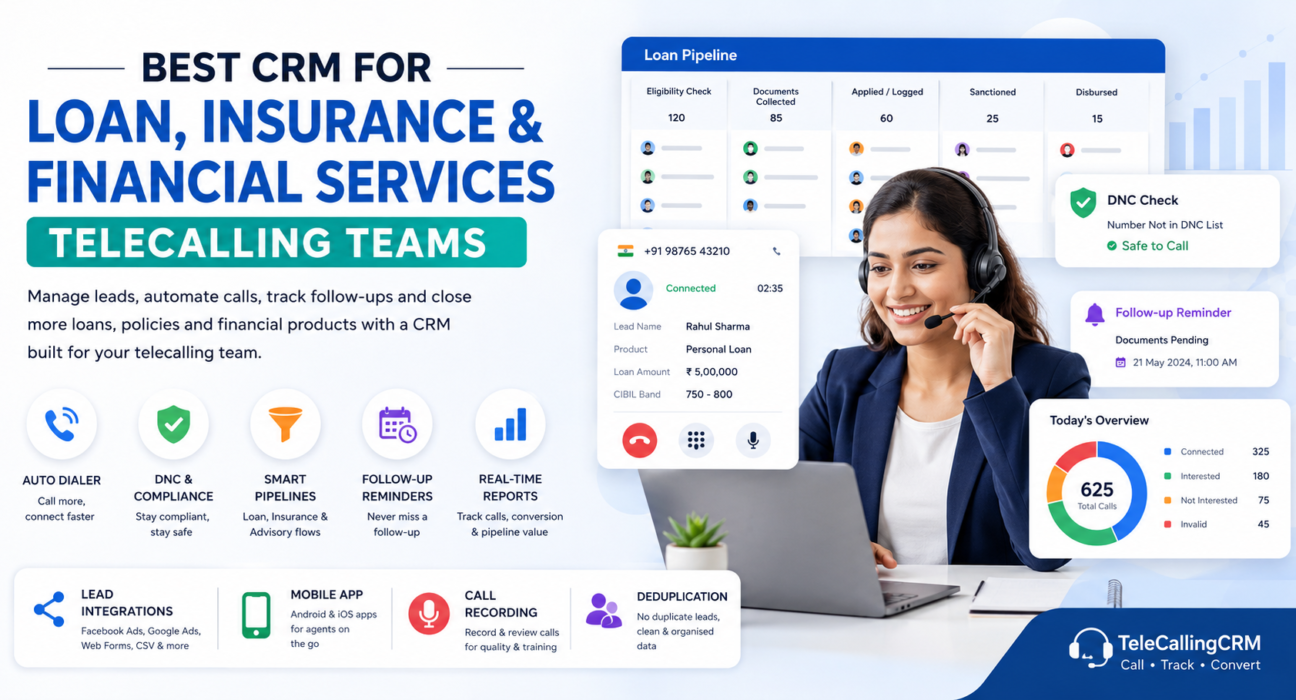
- An auto dialer built for volume. Sequential dialing through assigned lists. Call duration captures automatically, so agents talk instead of dialing.
- DNC and de-duplication built in. The system should skip DNC-registered numbers automatically and stop duplicate leads from reaching an agent twice.
- Lead source integrations. Leads from Facebook and Google Ads, portals, website forms or a CSV should land in the pipeline automatically, deduplicated and assigned to an agent.
Pipeline and follow-up
- Industry-specific pipeline stages. A loan pipeline (eligibility check → documents collected → sanctioned → disbursed) looks nothing like an insurance pipeline (needs assessment → quote shared → policy issued → renewal due). The CRM should support this natively, not force every product into the same generic stages.
- Custom lead fields. You should be able to capture loan amount and CIBIL band, or policy type and sum assured, or investment amount and risk profile — whatever your product needs.
- Follow-up and renewal reminders. Scheduled callbacks with overdue alerts keep a pending document or an upcoming renewal off the agent’s memory and on the system.
- A mobile app. DSAs, insurance agents and advisors often work outside a desk. Calling, logging outcomes and checking follow-ups from a phone matters.
- Real-time reporting. A sales manager should see calls made, conversion rate and pipeline value by stage without asking each agent individually.
How This Plays Out for Different Financial Services Teams
The setup looks a little different depending on the product you sell. These are hypothetical examples that show how it works in practice.
Example: A Loan DSA Team
A Direct Selling Agent (DSA) team gets a burst of personal and home loan leads from Facebook Ads and a lending portal each morning. A CRM built for loan and DSA telecalling tags each lead with loan type and amount right away. It moves the lead through an eligibility check, then flags it the moment it sits at “documents pending” for more than a day or two. Fewer files stall before disbursal as a result.
Example: An Insurance Agency
An insurance agency selling term, health and motor policies runs two jobs at once: converting new quotes and calling clients before renewals lapse. A CRM built for insurance telecalling stores the policy type, sum assured and renewal date on every lead. Agents can filter for “renewal due this month” and work through it as a dedicated call list instead of relying on memory or a separate spreadsheet.
Example: A Wealth Advisory or Distribution Team
A team selling mutual funds, deposits and insurance together needs to profile a prospect’s risk appetite and investment amount before making a proposal. A pipeline built around “profiling → proposal → onboarded” keeps every prospect moving forward. It also flags pending KYC, so onboarding doesn’t stall at the last step.
Benefits of Using a Purpose-Built CRM
- Fewer leads lost between ad platforms, portals and your team’s calling list
- Faster response on fresh leads, while interest is still high
- A clear view of loan, policy or investment pipeline value at any point in the month
- Fewer compliance issues, since DNC checks run automatically
- Renewal and document follow-ups that happen on schedule, not by chance
- Agents can work from a phone, which matters for field-based loan and insurance sales
Common Mistakes to Avoid
- Running everything on spreadsheets. They don’t dial, don’t remind anyone of a follow-up, and fall out of sync the moment two people edit them at once.
- Using one generic pipeline for every product. A loan file and an insurance renewal need different stages. Forcing both into “New, Contacted, Closed” hides where things actually get stuck.
- Skipping DNC checks manually. This creates a compliance risk. The CRM should handle it automatically, not the agent’s memory.
- Not tracking renewal or document-pending dates. These conversions are some of the easiest to win, and the first ones lost without a reminder.
- Choosing a CRM without a mobile app. Financial services calling doesn’t always happen from a desk. A desktop-only tool limits how field agents work.
How TeleCallingCRM Can Help
TeleCallingCRM offers industry-specific setups for financial services, loan & DSA, and insurance teams. Pipeline stages and lead fields already match how each product sells — eligibility and CIBIL band for loans, policy type and renewal date for insurance, risk profile and investment amount for advisory leads. Every plan includes a smart auto dialer, automatic DNC and duplicate checks, follow-up scheduling, and a mobile app for Android and iOS. Lead integrations cover Facebook and Google Ads, website forms, Google Sheets and industry portals, so enquiries land directly in the pipeline instead of a separate inbox.
This isn’t the only way to solve the problem. Some teams may prefer a broader enterprise CRM with financial-services modules added on. But for telecalling-first teams that need calling, pipeline tracking and compliance in one place, a purpose-built setup usually means less manual work per lead.
FAQs
What is a CRM for financial services?
A CRM for financial services helps loan, insurance and financial advisory teams manage leads, calls and follow-ups. It typically includes an auto dialer, product-specific pipeline stages, and fields for details like loan amount, policy type or investment amount.
Which CRM is best for loan DSA and insurance telecalling teams?
The right choice depends on whether it offers product-specific pipeline stages, DNC compliance, renewal tracking and a mobile app. Compare tools on these features rather than on branding alone, since loan and insurance sales don’t fit a generic pipeline well.
Do financial services teams really need a specialised CRM instead of a generic one?
Not strictly, but a generic CRM usually needs heavy customisation to add loan- or insurance-specific fields, DNC compliance and renewal tracking. A purpose-built telecalling CRM typically has these ready from day one.
How does a CRM help with loan document follow-up?
It flags applications sitting at “documents pending” and schedules reminder calls automatically. Agents don’t need to track pending files manually across a spreadsheet or notebook.
Can a telecalling CRM track insurance renewals?
Yes, as long as it stores a renewal date on each policy and lets agents filter leads by upcoming renewals, so calls happen before a policy lapses.
Is DNC compliance important for financial services calling?
Yes. Financial products draw a high number of complaints about unsolicited calls. Automatically skipping DNC-registered numbers protects the business from compliance issues, not just from wasted calls.
How much does a CRM for financial services cost in India?
Pricing varies by provider and by team size. TeleCallingCRM, for example, has plans starting at ₹999 per month for up to five users, with every feature included in every plan.
Can financial services teams set up a CRM without a long technical process?
Most modern telecalling CRMs are self-serve. Creating an account, importing a lead list and assigning agents usually takes minutes, not a dedicated implementation project.
Conclusion
Loan, insurance and financial advisory telecalling all run on the same basic need: call fast, track the right details, and follow up before a file or a renewal goes cold. A generic sales tool can be forced to do this, but it usually means extra manual work per lead. Choosing a CRM built for telecalling with financial-services pipelines already in place lets your team spend more time on calls and follow-ups, and less time managing the process around them.