CRM for Cold Calling Teams is no longer a nice to have for modern sales organizations. Ask any B2B sales team in India or anywhere else, and they will tell you that picking up the phone and talking to a potential customer still works. But here is the thing: doing it without the right system behind you is like trying to win a cricket match without a scoreboard. You have no idea what is happening, who called whom, and what was said.
That is exactly where a good CRM for cold calling teams comes in.
Choosing the wrong one wastes money, slows your team down, and honestly, frustrates your callers. Choosing the right one? It can completely change how your team performs.
This guide will walk you through what to look for, what to avoid, and how to make a smart decision without drowning in features you will never use.
Why Cold Calling Teams Need a Specialised CRM
Most general CRMs are built for the whole sales process from lead to deal closed. That is fine. But cold calling has its own set of problems.
Your callers are making 50 to 100 calls a day. They need to know instantly who to call next, what was said last time, and whether this person has already been contacted by someone else on the team. They do not have time to hunt through five tabs to find a phone number.
A CRM built or configured for cold calling handles all of this in a way that keeps callers moving fast. The right tool does not slow your team down it speeds them up.
Things to Look For When Choosing a CRM
1. Built-in Calling or Easy Phone Integration
This is non negotiable. If your callers have to switch between the CRM and a separate dialer every two minutes, you will lose a lot of time and a lot of call notes.
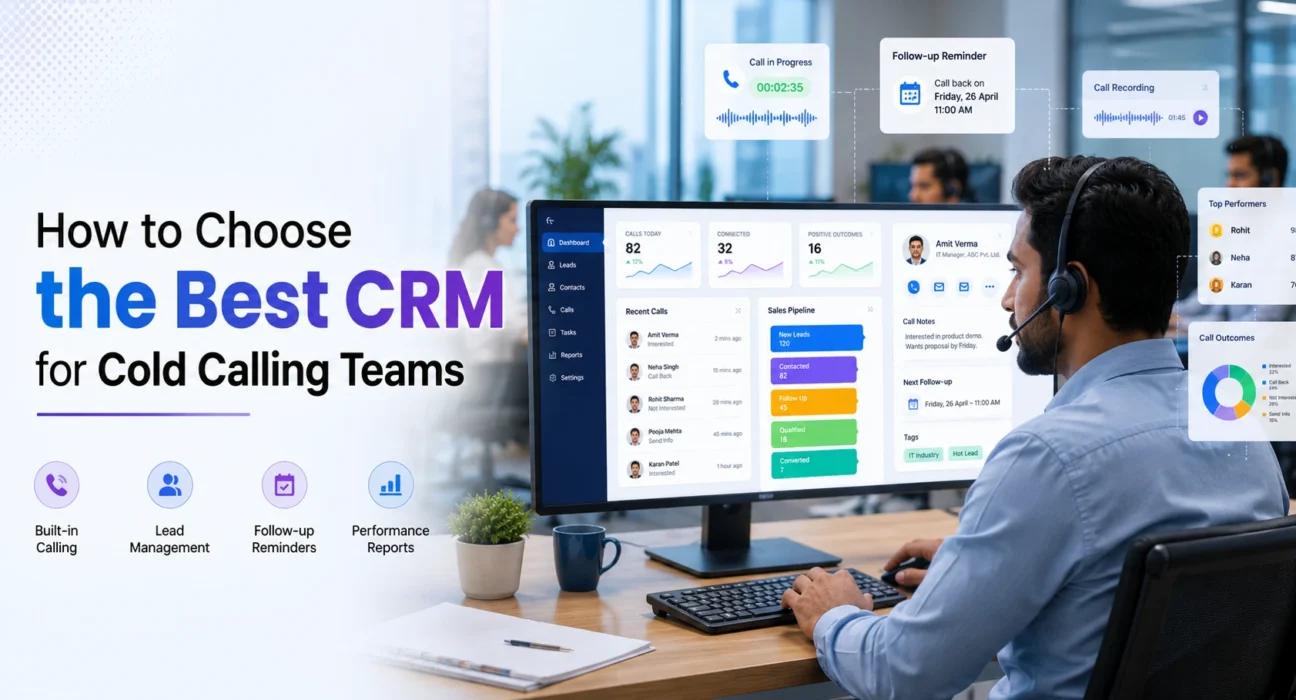
Look for a CRM that either has calling built right in or connects easily with tools like RingCentral, Just Call, Air call, or Exotel (popular in India). Some CRMs even have a power dialer, which automatically dials the next number on the list once a call ends. For high volume teams, this is a big deal.
2. Easy Lead Management
Your team needs a clean list of leads with clear statuses. Who has been called? Who needs a follow-up? Who said call back next Tuesday?
The CRM should let you filter, sort, and segment leads without any confusion. If your callers are spending five minutes just figuring out who to call next, the system is not working for you.
3. Call Logging Automatic if Possible
After every call, your caller should be able to log the outcome in seconds, not minutes. Dropdowns work better than long text fields here. Things like “Not Interested,” “Call Back,” “Interested Send Info,” and so on.
Even better if the CRM logs call recordings automatically and links them to the contact. This helps managers give proper feedback and helps callers recall what was discussed.
4. Follow-Up Reminders and Tasks
Cold calling is rarely a one call job. Most conversions happen after the third or fourth touch. Your CRM should make it dead simple to set a follow-up reminder right after a call ends ideally in two clicks.
If someone says “call me back on Friday,” your caller should be able to set that reminder immediately and move on. No delays, no complicated menu navigation.
5. Reporting That Actually Makes Sense
You need to know how many calls are being made, how many connect, how many lead to a positive outcome, and which callers are performing well.
Look for dashboards that show this clearly. You should not need to be a data analyst to understand your own numbers. Simple charts and tables that update in real time are what you want.
6. Speed Both the Software and the Setup
A slow CRM is the enemy of a cold calling team. If the page takes five seconds to load after every call, your callers will lose patience and you will lose data because they start skipping the logging step.
Also consider how long it takes to set up and train someone new. If onboarding a new caller takes a week just to learn the CRM, that is a problem.
Common Mistakes Teams Make When Picking a CRM
- Choosing based on features alone. More features does not mean better. A CRM with 200 features that your team uses only 10 of is just noise. Focus on what your team actually needs day to day.
- Ignoring mobile usability. If your callers are ever on the move or working from home, the CRM should work well on a phone or tablet too. A poor mobile experience kills adoption.
- Not checking integration options. You probably already use some tools WhatsApp Business, email platforms, Google Workspace, or something else. Make sure the CRM plays well with what you already have.
- Skipping the trial period. Almost every CRM offers a free trial. Use it. Put a few of your actual callers on it for a week and get their feedback. They are the ones using it every day their opinion matters more than any feature list.
- Not thinking about scale. A CRM that works fine for a team of 5 might become painful at 50. Ask the vendor directly: how does pricing and performance change as you grow?
Questions to Ask Before You Commit
Before signing up for anything, sit down and answer these honestly:
- How many calls does each person make per day?
- Do we need a power dialer, or is manual dialing fine for now?
- What happens to the data if we switch CRMs later can we export everything?
- How much are we willing to spend per user per month?
- Do we have someone who can set this up and manage it, or do we need something plug-and-play?
Your answers will narrow the field significantly.
What Your Callers Actually Want
It is worth talking to your team before making a final decision. Most callers want the same things: quick access to the next lead, an easy way to log what happened, and simple reminders for follow-ups. Anything beyond that is bonus.
If the CRM you are evaluating feels complicated to your callers during the trial period, trust that instinct. A tool that your team resists using will give you bad data and poor results no matter how impressive its feature set looks on paper.
Getting the Best Out of Your CRM After You Choose
Picking the CRM is just step one. Getting value from it requires a bit of discipline.
Set clear rules about how leads get logged. Make sure everyone is using the same status labels. Have a manager review the call reports weekly and give feedback based on real data. Use the recordings to coach callers on what is working and what is not.
A CRM is only as good as the habits built around it. The tool is the infrastructure your team’s consistency is what makes it work.
Conclusion
Picking the right CRM for cold calling teams is not about choosing the most popular name or the one with the longest feature list. It is about finding something that fits how your team actually works fast, practical, and without unnecessary friction.
Start with your team’s daily workflow. Map out the most common actions they take during and after a call. Then look for a CRM that makes those actions as simple and quick as possible.
Take advantage of free trials. Get your callers involved in testing. Ask the hard questions about pricing, support, and scalability. And once you commit, invest the time to set it up properly and train your team well.
Done right, a good CRM does not just organise your data it makes your cold calling team sharper, faster, and more confident every single day.