Auto Dialer vs Manual Dialing: Which Is Better for Sales Teams?
Every outbound sales team asks the same question sooner or later. Are we spending too much time dialing and not enough time selling? If your telecallers punch in numbers one by one from a spreadsheet, the answer is probably yes.
This is where the choice between an auto dialer and manual dialing matters. Businesses researching auto dialer software usually want one straight answer. Will it help the team talk to more leads, or does it just add another tool to manage?
This article compares how auto dialers and manual dialing actually work. It covers when each one makes sense and what sales teams should weigh before switching.
Quick Answer: Auto Dialer vs Manual Dialing
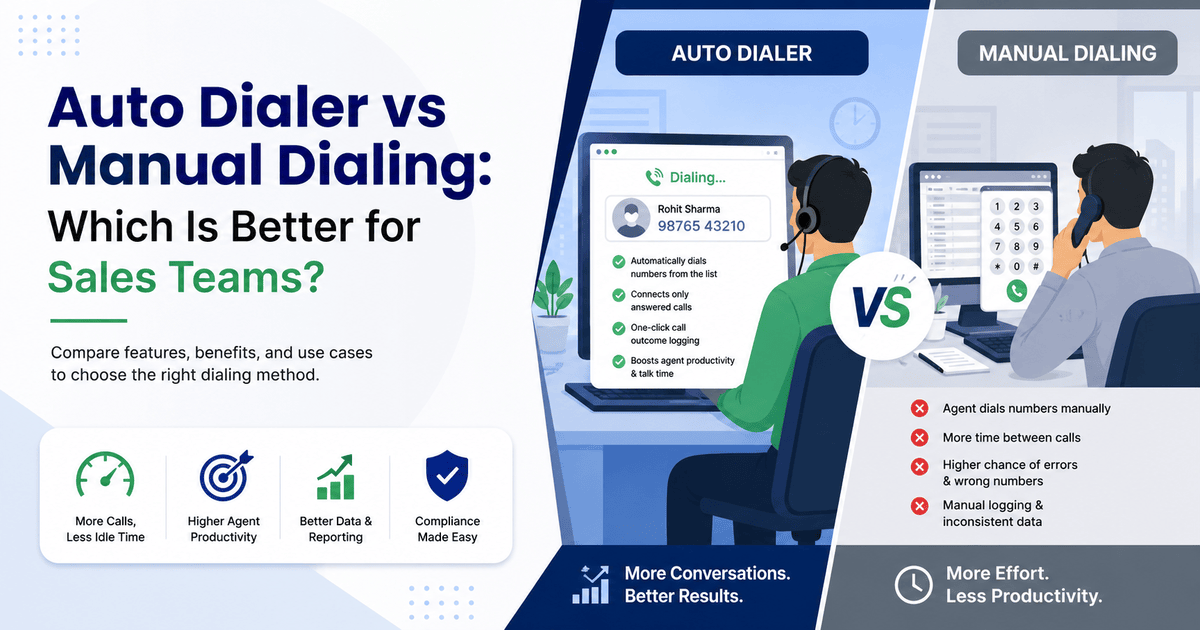
An auto dialer automatically dials phone numbers from a list and connects the agent only after someone picks up. This removes the manual dialing, redialing, and lookup work between calls. Manual dialing means an agent finds a number and dials it by hand for every single call.
Some teams make a high volume of outbound calls: real estate, insurance, education counselling, collections, or B2B prospecting. These teams benefit most from an auto dialer, since it increases talk time and lets agents fit in more conversations each day. Manual dialing still has a place for very small teams and highly personalised outreach. It also fits low call volumes where automation adds little value.
What Is Manual Dialing?
Manual dialing is the traditional way of making outbound calls. A telecaller looks up a contact — from a spreadsheet, a notebook, or a basic contact list. Then they dial the number using a phone or softphone.
The agent does every step by hand:
- Finds the next lead to call
- Types or dials the number
- Waits through rings, busy tones, or voicemails
- Logs the outcome manually afterward
For very small teams or low daily call volumes, manual dialing works fine. Problems tend to show up once call volumes grow. A large part of the agent’s day then goes into dialing and admin work instead of actual conversations.
What Is an Auto Dialer?
An auto dialer is a feature within telecalling software that dials numbers from an agent’s assigned lead list automatically. It works through the list in priority order, so the agent never has to key in a number by hand.
Most auto dialers used by sales teams follow a similar five-step sequence:
- The system pulls the next number from the agent’s assigned list.
- It dials the number automatically.
- If nobody answers, the system logs the call as missed and moves to the next number.
- When a lead answers, the call connects to the agent. The agent often sees the lead’s history and a call script already on screen.
- After the call, the agent logs the outcome with one tap, and the system queues the next call.
This differs from a predictive dialer, which dials several numbers per agent at once using statistical answer-rate models. Large call centres mainly run predictive dialers. Most small and mid-sized sales teams use a simpler auto dialer instead. The agent still sees who’s next but doesn’t dial manually.
Auto Dialer vs Manual Dialing: Key Differences
| Factor | Manual Dialing | Auto Dialer |
|---|---|---|
| Who dials the number | Agent, by hand, every time | System, automatically, from the assigned list |
| Gap between calls | Depends on agent speed and focus | Minimal — the next call is queued immediately |
| Wrong-number risk | Present (manual entry errors) | Reduced (numbers pulled directly from CRM data) |
| Call outcome logging | Usually manual, often delayed | One-tap logging, tied to the lead record |
| Best suited for | Small teams, low call volumes, highly personalised outreach | Teams making a high volume of outbound calls daily |
| Reporting accuracy | Depends on agents remembering to log calls | Call duration and outcome captured automatically |
| Calling-hours / DNC compliance | Needs manual checking | Can be enforced automatically within the system |
The core difference isn’t just speed. Manual dialing puts the process of calling on the agent. An auto dialer puts that process on the system instead, leaving the agent free to focus on the conversation itself.
Benefits of Using an Auto Dialer
More calls, less idle time. Agents don’t lose minutes between calls looking up numbers or redialing after a busy tone. Over a full working day, this adds up to meaningfully more conversations.
Fewer manual errors. Numbers come directly from the lead database. This leaves little risk of dialing a wrong digit or calling the same lead twice by mistake.
Better lead prioritisation. A good auto dialer works alongside lead management software to call hot leads first. This takes prioritisation off an agent’s memory or judgement.
Cleaner reporting. The system captures call duration, connection rate, and outcomes automatically. Agents no longer need to fill in a spreadsheet after every call.
Consistent follow-up. When dialing works together with lead follow-up tracking, the system pulls overdue and scheduled callbacks back into the calling queue. Nothing slips through the cracks.
Easier compliance. The system can enforce calling-hour restrictions and Do Not Call (DNC) numbers automatically. This matters in India, where TRAI permits commercial calls only between 9:00 AM and 9:00 PM. Violations can lead to number blocking and campaign suspension.
Where Manual Dialing Still Makes Sense
Automation isn’t always the right answer. Manual dialing can still be the practical choice when:
- The team is very small (one or two telecallers) and call volume is low.
- Calls are highly personalised, such as a senior relationship manager calling a handful of key accounts.
- The business doesn’t yet have clean, structured lead data to feed into a dialer.
- Budget constraints rule out a paid tool, at least for now.
In these situations, an auto dialer probably won’t add much value yet. It tends to become worthwhile once call volume, team size, or lead complexity grows.
Common Mistakes When Switching to an Auto Dialer
Not cleaning lead data first. An auto dialer will happily call duplicate, invalid, or already-converted leads if the underlying data isn’t clean. De-duplicating the list before switching saves a lot of wasted calls.
Ignoring calling-hour and DNC rules. Automation makes it easy to call in bulk. That same speed makes it easy to call outside permitted hours or DNC-registered numbers by accident, unless the system enforces these rules by default.
Skipping agent training. Agents used to manual dialing usually need a short adjustment period. They need time to get comfortable with a faster call pace and on-screen scripts.
Choosing a dialer without CRM context. A dialer that skips lead history, notes, and follow-up data just makes calls faster. It doesn’t make them more useful. Pairing dialing with a proper CRM for telecallers closes this gap.
Real-World Examples
(The following are illustrative scenarios based on common patterns in these industries, not specific customer case studies.)
Real estate: A real estate sales team receiving leads from property portals and Facebook ads needs to call fresh leads within minutes for a real chance of connecting. An auto dialer working from a prioritised, de-duplicated list helps agents get through the day’s lead volume without falling behind.
Education counselling: Admission counsellors call large batches of enquiry leads during peak admission season. Automated dialing paired with follow-up reminders helps them keep up, since many leads need two or three calls before deciding.
Insurance and financial services: Renewal and cross-sell calling at scale benefits from consistent, logged outreach. This helps both productivity and compliance record-keeping.
Call centres and BPOs: Call volume is the core metric in call centres and BPOs. Small per-call time savings from an auto dialer add up fast for a call centre team working through hundreds of calls a day.
How TeleCallingCRM Supports Both Dialing and Lead Management
Once a team decides an auto dialer is the right move, the dialer rarely works alone. It performs best as part of a connected system. TeleCallingCRM combines a smart auto dialer with lead scoring, automatic call-outcome logging, and follow-up reminders. It also includes a live war room dashboard that shows agent call activity in real time.
This matters because the value of moving away from manual dialing isn’t just faster dialing. It’s what happens with the data the dialer generates. That data shows which leads the team called and how many attempts each took. It also shows the outcome of every call and when the next follow-up falls due. A dialer without that context still leaves managers guessing.
Frequently Asked Questions
Is an auto dialer legal in India?
Yes, auto dialers are legal for outbound sales calling in India. The business needs to follow TRAI’s permitted calling-hour window: 9:00 AM to 9:00 PM. It also needs to maintain DNC (Do Not Call) compliance for registered numbers.
Does an auto dialer increase the number of calls an agent can make?
Yes. Because the system removes manual dialing and lookup time between calls, agents typically get through more calls in the same working day compared with manual dialing.
What’s the difference between an auto dialer and a predictive dialer?
An auto dialer typically dials one number at a time per agent from a list. A predictive dialer dials multiple numbers simultaneously across a team based on statistical prediction of answer rates. Large call centres mainly use predictive dialers.
Is manual dialing ever better than an auto dialer?
For very small teams, low call volumes, or highly personalised relationship calling, manual dialing can be simpler. It doesn’t require a dialer investment, though it becomes less practical as call volume and team size grow.
Do I need a CRM to use an auto dialer?
An auto dialer works best paired with a CRM. It needs a structured lead list to dial from, plus a place to log outcomes and schedule follow-ups. Using a dialer without a CRM behind it usually just shifts the disorganisation from calling to reporting.
Will switching to an auto dialer improve conversion rates?
An auto dialer improves how many leads agents reach and how consistently follow-ups happen, which supports conversions. Conversion still depends on lead quality, script, pricing, and agent skill, so no dialer guarantees a specific increase in sales.
How do auto dialers handle Do Not Call (DNC) numbers?
Most auto dialer systems let teams maintain a DNC list, so the system automatically skips those numbers during dialing. This reduces compliance risk compared with manual checking.
Conclusion
For most growing sales teams, an auto dialer is the more practical choice. It makes sense once call volume goes beyond what a couple of agents can handle by hand.
It cuts down idle time between calls and reduces manual errors. Paired with proper lead tracking, it also gives managers accurate visibility into what the team is doing all day. Manual dialing isn’t wrong; it’s simply a better fit for smaller, low-volume, high-touch calling that doesn’t yet need automation.
The right starting point is to look honestly at call volume and team size. Then weigh how much time manual dialing tasks currently cost the team. Teams ready to make the shift can read our guide on choosing the right telecalling software. It covers what to look for beyond the dialer itself.