Introduction
Switching from registers and spreadsheets to a digital system can feel overwhelming if you’ve never done it before. Where do you start? What do you enter first? Will you lose track of tenants during the switch? This guide walks you through how to use PG management software step by step, from setting up your property details to handling daily tenant and rent activity.
Whether you’re running a single PG or managing several hostel buildings, PG and hostel management software can bring your property details, tenants, rent, and daily operations into one place; you just need to know how to set it up correctly from day one.
What Is PG Management Software?
PG management software is a digital platform built to help PG and hostel owners manage properties, tenants, rooms, beds, rent, and daily operations from one dashboard instead of scattered notebooks, spreadsheets, and messaging apps.
Instead of manually tracking who lives where, who has paid rent, and which rooms are vacant, the software centralises this information so owners and managers can see the full picture of their property at any time.
Typical capabilities include:
- Property, building, and room setup
- Bed-level occupancy tracking
- Tenant records and KYC details
- Rent tracking and collection
- Complaint and maintenance tracking
- Expense tracking
- Reports on occupancy, rent, and operations
Who Should Use PG Management Software?
PG management software is useful for anyone responsible for the day-to-day running of a paying guest accommodation or hostel, including:
- PG and hostel owners managing one or multiple properties
- On-site managers or wardens handling daily tenant interactions
- Co-living operators running shared accommodation at scale
- New PG business owners setting up systems from the start instead of switching later
If you’re currently relying on registers, spreadsheets, or a mix of WhatsApp messages to track tenants and rent, a management system is worth setting up before your property grows further.
How to Use PG Management Software: Step-by-Step Setup
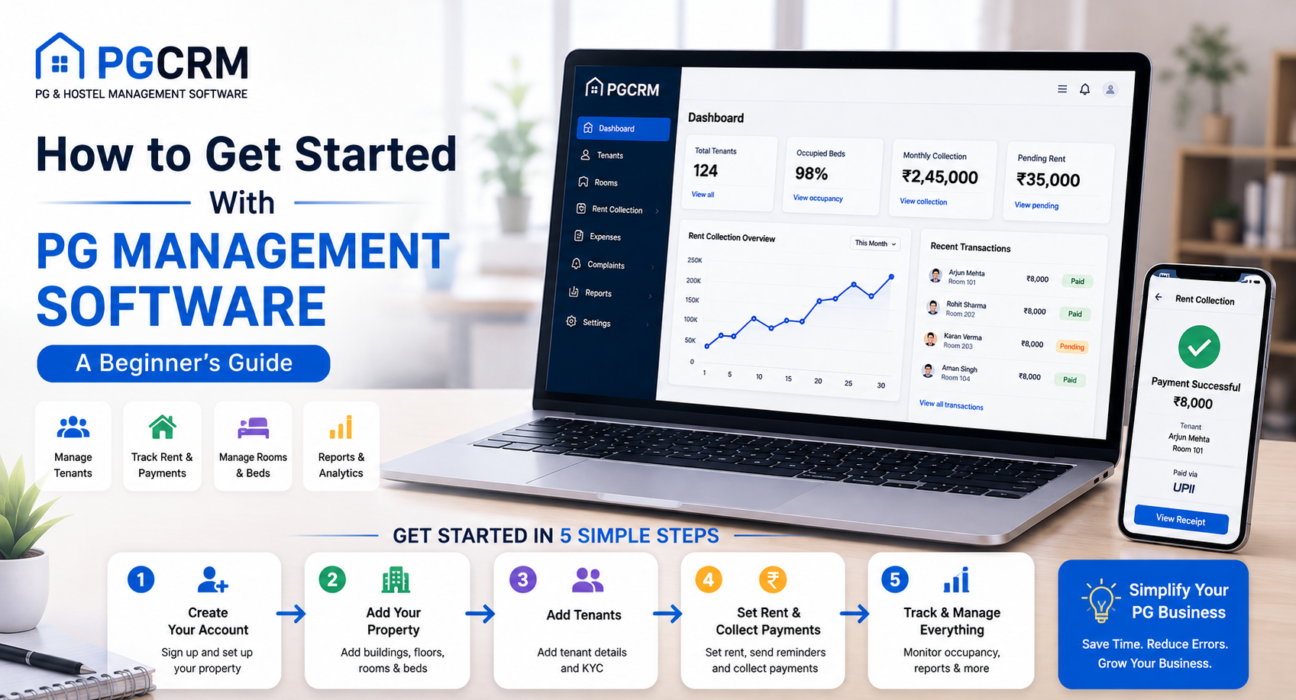
Getting started with PG management software involves a few clear stages: setting up your property structure, adding tenants, configuring rent and reminders, and using the system for daily operations. Here’s how to approach each one.
Step 1: Set Up Your Property, Buildings, and Rooms
Start by entering your property structure into the system. This usually means:
- Adding your property or properties (if you manage more than one PG or hostel)
- Creating buildings, if your PG spans multiple structures
- Adding rooms within each building
- Adding beds within each room, especially for shared occupancy
Setting this up accurately matters because everything else — tenant assignments, rent tracking, and occupancy reports — depends on having correct room and bed data from the start.
Step 2: Add Tenant Records
Once your rooms and beds are set up, the next step is adding your tenants. For each tenant, you’ll typically enter:
- Basic details (name, contact information, ID or KYC details)
- Room and bed assignment
- Rent amount and due date
- Move-in date
Entering existing tenants accurately at this stage prevents confusion later, especially when it comes to matching past rent payments with the correct tenant and room.
Step 3: Configure Rent Tracking and Reminders
With tenants assigned to rooms and beds, decide how you’ll track rent:
- Confirm each tenant’s rent amount and due date
- Record any existing dues or advance payments
- Set up rent reminders so tenants get notified before or around the due date
- Decide how you’ll log payments – cash, UPI, or both
This is the stage where PG management software starts replacing your manual rent register with a system that tracks payments automatically as you record them.
Step 4: Set Up Complaint and Maintenance Tracking
If your software includes complaint management, use this stage to set up how tenant complaints or maintenance requests get logged and resolved. Even a simple system – where complaints get recorded with a status like open, in progress, or resolved is far easier to manage than tracking issues through phone calls or messages alone.
Step 5: Start Using the System for Daily Operations
Once the initial setup is complete, daily use typically involves:
- Recording rent payments as tenants pay
- Updating occupancy when tenants move in or out
- Logging and resolving complaints
- Tracking expenses related to the property
- Reviewing reports periodically to check rent collection and occupancy status
Common Mistakes to Avoid When Getting Started
New users often run into the same few issues when setting up PG management software for the first time.
Skipping Accurate Initial Data Entry
Entering incomplete or incorrect tenant and room details at the start creates problems later, especially when reconciling rent history or occupancy reports. It’s worth taking the time to enter accurate data upfront rather than fixing it after the fact.
Not Migrating Existing Rent History
If you switch from a manual register partway through the month or year, record existing dues and past payment status in the new system. Otherwise, rent reports won’t reflect the complete picture for tenants who were already paying before the switch.
Ignoring Reports After Setup
Some owners set up the software and then only use it to log payments, without checking reports. Reviewing occupancy and rent reports regularly is where the real value of centralised tracking shows up – it helps you catch pending dues or vacant beds early.
Manual Setup vs. Guided Setup
| Approach | What It Looks Like | Best For |
|---|---|---|
| Manual self-setup | Entering properties, rooms, and tenants yourself using the software’s interface | Owners comfortable with basic data entry |
| Guided or assisted setup | Support from the software provider during initial setup | Owners with larger properties or limited time |
Either approach works, but larger properties with many rooms and tenants generally benefit from a more structured, phased setup rather than entering everything at once.
How PGCRM Supports This Process
PGCRM is built around the day-to-day operations PG and hostel owners deal with – property and room setup, tenant management, rent tracking, complaint management, and reporting – all from a centralised dashboard. Using PG management software such as PGCRM can help owners bring tenant records, rent tracking, occupancy data, and daily operations into one system instead of managing them across separate tools and spreadsheets.
FAQ
How do I start using PG management software for the first time?
Begin by setting up your property, buildings, rooms, and beds, then add tenant records with their room assignments and rent details. After that, configure rent reminders and payment tracking before moving on to daily use, such as logging payments and updating occupancy.
Is PG management software difficult to learn?
Most PG management software targets non-technical users and follows a straightforward setup process: property details, then tenants, then rent. The learning curve mainly involves getting comfortable with data entry during the initial setup rather than complex technical steps.
Can I switch to PG management software mid-year?
Yes. You can start using PG management software at any point. The key step is recording existing tenants’ rent status — what’s been paid and what’s pending — so your reports reflect an accurate picture going forward, rather than starting with incomplete data.
Do I need to enter all my tenants at once?
It’s more practical to enter your current tenants during initial setup so the system reflects your actual occupancy. You can then add new tenants going forward as they move in, without needing to re-enter existing records.
What information do I need before setting up PG management software?
You’ll generally need your property and room structure, current tenant details (name, contact, ID/KYC information), room and bed assignments, rent amounts, and due dates. Having this information ready before setup makes the process faster and reduces data entry errors.
Can PG management software handle both cash and UPI rent payments?
Most PG management software supports recording both cash and UPI payments, letting owners log transactions as tenants pay regardless of payment mode. This creates a documented record for both digital and cash-based rent collection.
How long does it take to set up PG management software?
Setup time depends on property size. A single PG with a handful of tenants can typically get set up within a day, while larger properties with multiple buildings and many tenants may take longer, especially if historical rent data needs entry.
Conclusion
Getting started with PG management software doesn’t need to be complicated if you approach it in stages: set up your property structure, add tenants accurately, configure rent tracking, and then move into daily use. Taking the time to enter correct data at the start pays off through clearer occupancy visibility and more reliable rent reports later. If you’re ready to move away from manual tracking, explore PGCRM to see how a PG and hostel management platform can bring your property setup, tenant records, and rent tracking together in one place.