What Is a Telecalling CRM? Features, Benefits and How It Works
Most calling teams do not lose deals because their callers are weak. They lose deals because a follow-up sits in someone’s notebook, a lead from an ad form reaches the caller two days late, or two executives call the same person while a third lead is never called at all.
Once your team makes more than a handful of outbound calls a day, a spreadsheet stops being a system and starts being a risk. A telecalling CRM is built for this situation: it holds the leads, decides who calls whom, records what happened on the call, and makes sure the next call happens on time.
What Is a Telecalling CRM?
A telecalling CRM is software that helps outbound calling teams manage leads, dial numbers, log call outcomes and schedule follow-ups from one place. Unlike a general CRM, it is built around the call itself — dialling, call disposition, callback reminders and caller productivity — rather than around long sales documentation.
In simple terms, a general CRM is designed to store customer relationships. A telecalling CRM is designed to run a calling shift. Both hold data, but they are optimised for different daily work.
Telecalling CRM vs Spreadsheet vs General CRM
| Area | Spreadsheet | General CRM | Telecalling CRM |
|---|---|---|---|
| Lead assignment | Manual, error-prone | Possible, often manual | Automatic rules (round-robin, language, availability) |
| Dialling | Copy and paste numbers | Sometimes via add-on | Built-in dialler, calls in priority order |
| Call outcome | Typed by hand | Free-text notes | One-tap disposition, standard outcomes |
| Follow-ups | Personal memory | Task module | Callback reminders tied to call outcome |
| Call recording | Not available | Rarely native | Native recording and playback |
| Manager visibility | End-of-day file | Reports after data entry | Live activity and call reports |
Spreadsheets are not useless. For a two-person team calling ten leads a week, a spreadsheet is fine. But once you add a second caller, a second lead source and a monthly target, the cost of missed follow-ups usually crosses the cost of software.
How Does a Telecalling CRM Work?
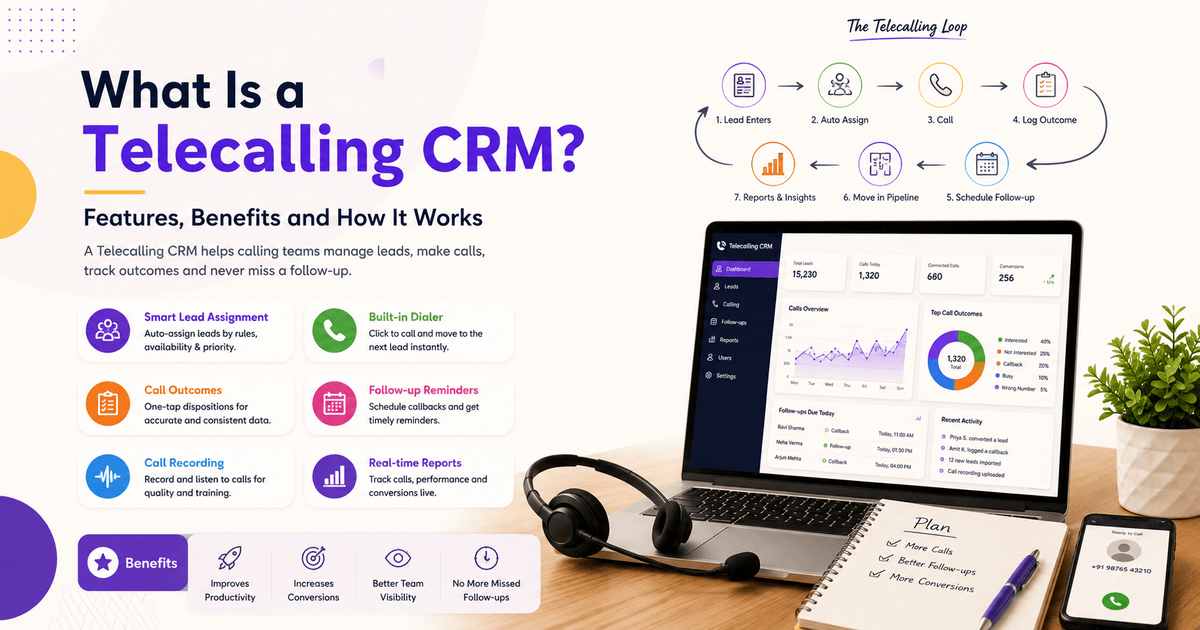
A telecalling CRM works as a loop. Leads come in, get assigned, get called, get an outcome, and either move forward in the pipeline or come back for a scheduled follow-up.
Here is the typical flow:
- Leads enter the system from ad platforms, portals, website forms or a bulk Excel import, with duplicates detected so the same person is not called twice.
- Leads are assigned automatically by rotation, language, territory or which caller is currently available.
- The caller starts a calling session. Instead of searching for the next number, they see the next lead in priority order and dial from within the app.
- The outcome is logged in one tap — interested, not interested, busy, wrong number, callback, converted.
- A follow-up is scheduled. If the outcome is “callback”, the reminder is created immediately with a date and time, so nothing depends on memory.
- The lead moves through a pipeline — fresh, contacted, qualified, negotiation, closed — with the current stage visible to the manager.
- Managers review reports: calls made, connected calls, talk time, and conversions by caller and lead source.
The important part of this loop is step 4. Structured call outcomes turn a pile of calls into usable data. When outcomes are typed as free text, no report is reliable.
Core Features of a Telecalling CRM
Different products package these differently, but the following capabilities define the category. You can see how one Indian product organises them on the telecalling CRM features page.
Lead management and distribution
Bulk import from Excel, automatic capture from lead sources, duplicate detection, and rules that assign each lead to a caller without a manager doing it by hand.
Dialling
A built-in dialler that presents leads in order and moves to the next one after the outcome is logged. This removes the copy-paste step that quietly eats a large share of a caller’s shift.
Call outcomes and disposition
A fixed set of outcomes for every call, so “interested” means the same thing across the team and reports stay comparable.
Follow-up and reminder management
Callback scheduling attached to the lead, with reminders that reach the caller. This is the single most valuable function for most small teams — lead follow-up software exists mainly because human memory does not scale.
Call recording and history
Every call attached to the lead record, with recordings available for review — useful for training, dispute resolution and understanding why a segment is not converting.
Pipeline, reporting and messaging
Custom stages with deal values; reports covering call volume, connection rate, talk time and conversion by source and caller; and SMS, email or WhatsApp follow-up sent from the same record.
Mobile access and automation
Field and remote callers need the same dialler on a phone, not only a desktop. Automation rules then trigger on a call outcome or stage change — for example, creating a follow-up task when a lead is marked “interested”.
Benefits of Using a Telecalling CRM
- Fewer missed follow-ups. Scheduled callbacks with reminders remove the most common leak in outbound sales.
- Faster response to new leads. Automatic assignment shortens the gap between a lead arriving and the first call.
- More talk time per caller. Less time spent searching, copying numbers and updating a sheet.
- Honest reporting. Reports are built from logged calls rather than from self-reported daily numbers.
- Continuity when people leave. Call history stays with the lead, so a new caller can pick up the conversation.
- Better coaching. Recordings and outcome patterns show which part of the pitch is failing.
None of these are automatic. They depend on callers actually logging outcomes and managers actually reviewing reports.
Who Should Use a Telecalling CRM?
A telecalling CRM is useful when calling is a core process, not an occasional activity. Typical users include:
- Real estate teams handling enquiries from property portals and ad campaigns, where speed of first call matters and one lead may need six or seven follow-ups.
- Education and coaching institutes running admission cycles, where a counsellor may manage hundreds of enquiries in a short window.
- Insurance and loan agents working renewal and eligibility lists that repeat every year.
- Recruitment teams calling candidate shortlists and tracking interview stages.
- Call centres and BPOs where per-caller productivity is measured daily.
- B2B sales teams doing outbound prospecting with multi-touch sequences.
Product pages for several of these — such as real estate, education and call centre teams — show how the same core system is configured differently for each workflow.
A realistic example
Consider a hypothetical coaching institute with four counsellors during admission season. Enquiries arrive from a website form, an ad campaign and walk-in registers. Without a system, each counsellor keeps a personal list, and parents who asked for a callback “after 6 pm” are called at random times or not at all.
With a telecalling CRM, those enquiries land in one pool, split automatically between the four counsellors, and every “call after 6 pm” becomes a timed reminder. The institute does not get more enquiries — it stops losing the ones it already has. This is an illustrative example, not a reported customer result.
Limitations: What a Telecalling CRM Will Not Do
Being honest about limits is part of choosing well.
- It will not improve a weak pitch. Software organises calls; it does not persuade anyone.
- It will not fix poor lead quality. Faster calling of bad leads only produces faster rejection.
- It will not work without discipline. If callers skip outcome logging, reports become fiction.
- It may not replace a full CRM for complex B2B cycles. Long, document-heavy enterprise sales often need a broader system.
- It cannot exempt you from telecom rules.
On that last point: commercial calling and messaging in India are regulated by the Telecom Regulatory Authority of India under the Telecom Commercial Communications Customer Preference Regulations (TCCCPR), 2018, strengthened by amendments announced in February 2025 covering complaint handling, sender identification and stricter action against repeat violations. Software can support compliance — for example by respecting do-not-call lists — but it does not transfer responsibility.
Common Mistakes Teams Make
- Buying before defining the process. Decide your stages and call outcomes first, then configure the software to match.
- Importing everything. Old, unqualified lists inflate the database and depress connection rates.
- Creating too many outcome options. Fifteen dispositions guarantee inconsistent logging; six to eight is usually enough.
- Skipping caller training. Two hours of hands-on training prevents months of bad data.
- Not reviewing reports. A dashboard nobody opens changes nothing.
- Ignoring mobile. If much of the team calls from phones, a desktop-only tool will be bypassed.
Where TeleCallingCRM Fits
TeleCallingCRM is an Indian telecalling CRM built for outbound sales teams. Its stated capabilities include a smart auto dialler, lead management with auto-distribution and deduplication, follow-up reminders, call recording with retention controls and DNC enforcement, sales pipeline and forecasting, SMS/email/WhatsApp messaging, live team monitoring, real-time reports, Android and iOS apps, no-code automation and AI call analysis.
If you are still comparing options, the guide on how to choose the best telecalling CRM covers the evaluation criteria in more detail.
Frequently Asked Questions
What is the difference between a CRM and a telecalling CRM?
A general CRM stores customer relationships, deals and documentation across the whole sales cycle. A telecalling CRM is built around outbound calling — dialling, call outcomes, callback reminders and caller productivity reports. Many businesses use a telecalling CRM because the calling layer is where their revenue actually moves.
Is telecalling software only for call centres?
No. Call centres are heavy users, but real estate teams, coaching institutes, insurance agents, recruitment firms and B2B sales teams use the same software. Any team where two or more people call leads daily and follow-ups repeat over weeks will benefit from structured call tracking.
How does a telecalling CRM improve follow-ups?
Follow-ups are created at the moment a call outcome is logged, with a date and time attached to the lead record. The caller receives a reminder, and the manager can see pending and overdue callbacks. This replaces personal memory and notebooks, which is where most follow-ups are lost.
Does a telecalling CRM record calls?
Most telecalling CRMs support call recording, with the recording linked to the lead record. Recordings are used for training, quality review and dispute resolution. Recording practices should follow applicable consent, data protection and telecom regulations in your region.
Can a small team of three or four callers use one?
Yes. Small teams often see the clearest improvement, because a single missed follow-up is a larger share of their pipeline. The main requirement is not team size but call volume and the number of follow-ups each lead needs.
What should we prepare before implementing a telecalling CRM?
Define your pipeline stages, agree on a short list of call outcomes, clean your lead list, decide assignment rules, and identify the three or four reports managers will review weekly. Doing this before setup makes implementation faster and the data usable from day one.
Does telecalling software guarantee more sales?
No responsible answer says yes. A telecalling CRM removes process losses — missed callbacks, slow first contact, unassigned leads and unreliable reporting. Whether that converts into more sales depends on lead quality, pricing, product fit and the skill of the callers.
Conclusion
A telecalling CRM is not a magic conversion tool. It is a process system for teams whose revenue depends on calls being made, logged and followed up in order. The value comes from three simple things: every lead has an owner, every call has an outcome, and every follow-up has a time.
If your team is still tracking calls in a spreadsheet, start by writing down your stages and call outcomes on paper. Once that is clear, comparing CRM software for telecallers becomes a much easier decision — you will know exactly which features you need and which ones you can ignore.