How to Improve Retail Store Visit Compliance With Digital Tools
Head office sets the planogram, the visit schedule and the audit checklist. Then the merchandiser walks into the store, and nobody really knows what happens next until a regional manager visits in person. That gap between plan and proof is why retail store visit management software is replacing WhatsApp photos, paper audit sheets and end-of-month Excel reports.
This guide explains what store visit compliance means, where it breaks down, and how digital tools fix it. It also gives a practical rollout plan you can follow.
What Is Retail Store Visit Compliance?
Retail store visit compliance is the degree to which field staff visit the right stores, on the planned schedule, and complete the required tasks at each one. It covers visit frequency, time spent in store, audit completion and execution quality.
Compliance usually has three layers:
- Coverage compliance: Did every assigned store get visited as planned?
- Presence compliance: Was the visit real, and did it happen at the actual outlet?
- Execution compliance: Were the shelf, stock, planogram and promotion standards checked and recorded properly?
Most teams track the first layer loosely, the second by trust, and the third by sampling. Digital tools let you measure all three.
Why Store Visit Compliance Breaks Down
Compliance rarely fails because reps do not care. It fails because the process gives managers no way to see it. Common causes include:
- Unverified visits. A rep reports “visited” but nothing proves where they were or how long they stayed.
- Scattered data. Photos sit in WhatsApp groups, notes in notebooks and attendance in spreadsheets.
- Inconsistent audits. Different agencies and supervisors use different checklists, so results cannot be compared.
- Delayed visibility. Out-of-stocks and planogram gaps surface at month-end, when the sales are already lost.
- Weak coverage planning. Store lists and visit orders are set by habit rather than by priority or location.
What Is Retail Store Visit Management Software?
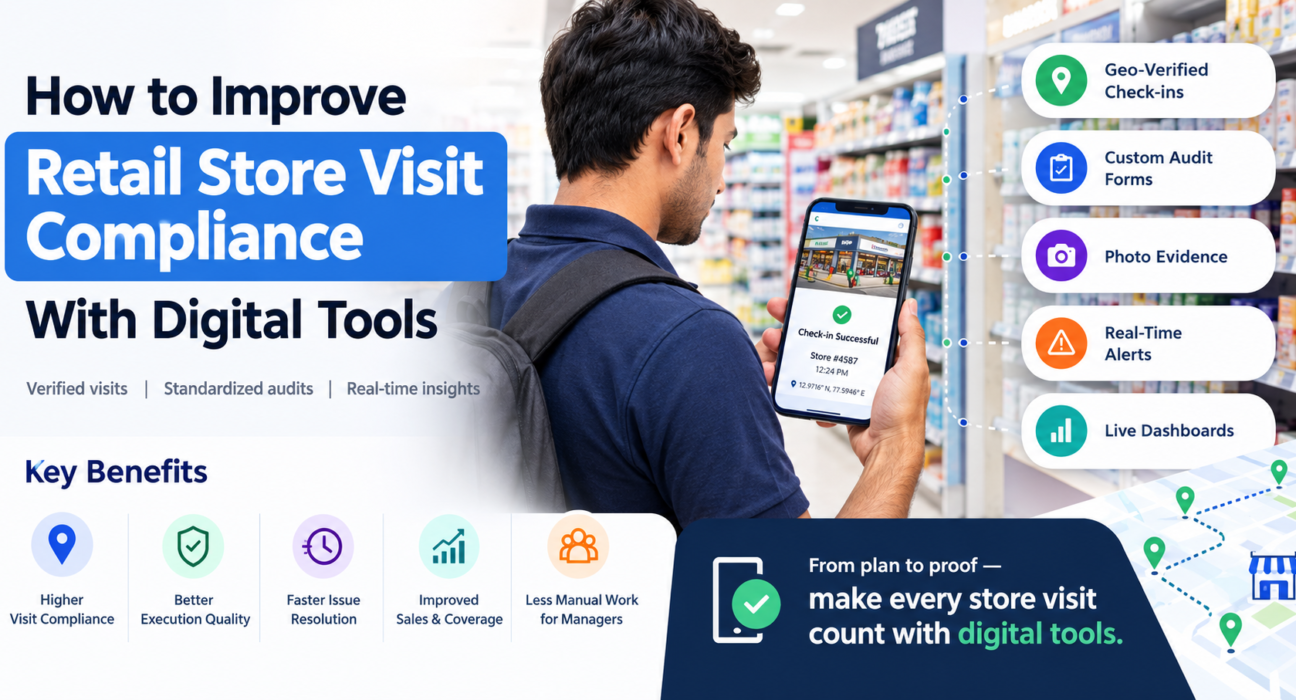
Retail store visit management software is a mobile and web platform that assigns store visits, verifies check-ins by GPS, captures photo-backed audits and reports compliance in real time. It replaces manual reporting with structured, time-stamped and location-tagged data.
It is often sold under related names: store visit tracking software, retail audit software, merchandising apps or in-store execution software. The core job is the same. It gives managers proof of presence and proof of work for every outlet.
7 Ways Digital Tools Improve Store Visit Compliance
1. Assign Stores and Visit Plans Digitally
Give each merchandiser a store list, visit schedule and task checklist on their phone. Managers can see what was planned against what was completed, with no chasing by phone.
2. Verify Presence With Geo-Verified Check-Ins
A GPS check-in at the outlet turns “I visited” into a time-stamped, location-stamped record. Geofencing confirms the rep was at the store and not at a nearby tea stall.
3. Standardize Audits With Custom Forms
Build one audit checklist covering shelf, stock, planogram, pricing and competitor activity, then use it across every team and agency. Mandatory fields stop reps from skipping steps, and every response is comparable.
4. Require Photo Proof for Every Audit
Photos tied to a checklist item are far harder to dispute than a tick box. A mandatory photo for shelf and planogram checks gives you proof of work, not just proof of presence.
5. Flag Out-of-Stocks and Gaps the Same Day
When a merchandiser logs an out-of-stock SKU with a photo, the supervisor can be alerted immediately. Catching a gap the same day is the difference between a quick refill and a week of lost sales.
6. Plan Better Routes and Beats
Compliance improves when visit plans are realistic. Optimized store order and navigation reduce travel time and idle gaps, so reps can complete the full list rather than skipping the last stores of the day.
7. Report Compliance by Store, Rep and Region
Live dashboards replace manual consolidation. You can see which stores were missed, which reps are consistently late and which regions are slipping on planogram scores.
Manual vs Digital Store Visit Tracking
| Area | Manual tracking | Digital store visit management |
|---|---|---|
| Visit proof | Verbal or WhatsApp message | GPS check-in with time stamp |
| Audit quality | Varies by person | Standard custom checklist |
| Photo evidence | Scattered in chats | Attached to each audit item |
| Issue detection | Month-end review | Same-day alerts |
| Reporting | Manual spreadsheets | Live dashboards by store and region |
| Manager effort | High follow-up | Exception-based review |
How to Choose Retail Store Visit Management Software
Use this checklist when you evaluate options:
- Geo-verified check-in: Does it confirm the rep is at the outlet?
- Custom audit forms: Can you build planogram, stock and competitor checklists without code?
- Mandatory photo capture: Can you make photos compulsory for audit items?
- Offline capability: Does it work in basements, malls and low-network areas?
- Real-time dashboards: Can managers and brands see compliance by store and region?
- Alerts and escalation: Does it flag issues as they happen?
- Easy onboarding: Can field staff learn it quickly on standard smartphones?
- Integrations and pricing: Does it fit your existing systems and scale with team size?
How FieldExecutives Supports Store Visit Compliance
Businesses looking to simplify these processes can use field force management software such as FieldExecutives. Based on its retail and merchandising capabilities, it supports store visit work in these ways:
- Store lists and forms: Each merchandiser receives their store list, audit forms and planogram targets for the day.
- Geo-verified check-in: Reps check in with GPS at each outlet, with optimized store order and navigation.
- Photo-backed audits: Shelf, planogram, stock and competitor audits are captured against a custom checklist with mandatory photos.
- Live compliance views: Audits sync live, giving share-of-shelf and compliance scores by store and region.
- Promoter and coverage tracking: Teams can track promoter attendance and store coverage on one live map.
- Offline-first mobile app: Reps can capture visits and photos without a network, and data syncs when they reconnect.
Because forms and workflows are configurable without code, you can match the audit to your own category, brand standards and agency structure.
Practical Rollout Plan: 5 Steps
- Define compliance. Agree on what counts as a compliant visit: frequency, minimum time in store, required audit items and required photos.
- Build one standard checklist. Start with the five to ten checks that matter most, such as shelf share, planogram adherence and stock availability.
- Pilot with one region. Test with a small team of merchandisers and supervisors, and collect feedback on form length and workflow.
- Train on the why. Explain that the goal is accurate records and fewer follow-up calls, not surveillance. Location features should apply only to on-duty staff who have granted permission.
- Review weekly. Use the dashboard to coach reps, fix missed-store patterns and refine the checklist.
Metrics to Track
- Planned vs completed store visits
- Geo-verified check-in rate
- Audit completion rate
- Photo-backed audit percentage
- Average time in store
- Out-of-stock incidents and resolution time
- Planogram or shelf compliance score by store and region
Track these over time and compare reps, stores and regions. Look for patterns rather than single bad days.
Conclusion
Store visit compliance improves when visits become verifiable, audits become standard and issues become visible the same day. The right retail store visit management software gives you proof of presence, proof of work and live reporting in one system, so you manage by exception instead of by follow-up.