Mobile app idea validation means testing whether real people have the problem your app solves, and whether they would use and pay for your solution, before you spend money on design and development. You do it through customer interviews, competitor research, landing page tests, prototypes, and a limited MVP. Most failed apps were not badly built. They solved a problem too few people cared about.
For startup founders, the risk is real. Development takes months and a large share of your early budget. Skipping mobile app idea validation means betting all of it on an assumption. This guide walks through a practical, low-cost process you can follow, the signals that tell you to go ahead or stop, and how to choose a development partner once your idea holds up.
What Is Mobile App Idea Validation?
Mobile app idea validation is the process of gathering evidence that a specific group of users has a real problem, wants your proposed solution, and would adopt it over what they use today.
It is different from market research. Market research asks whether a category is large. Validation asks whether your idea, for your audience, is worth building. It is also not a one-time task. You collect evidence in stages, and each stage should either raise your confidence or save you from a costly mistake.
Why Should Startups Validate an App Idea Before Development?
Validation reduces financial risk, shortens the path to a useful product, and gives you proof to show investors and development partners. Specifically, it helps you:
- Avoid building features nobody needs. Early feedback shows which features matter.
- Control your budget. Fixing a wrong assumption in a prototype costs far less than rewriting a built app.
- Write a better brief. Development companies can estimate scope and cost more accurately when you know your core features.
- Strengthen fundraising conversations. Evidence of demand is more convincing than a pitch deck alone.
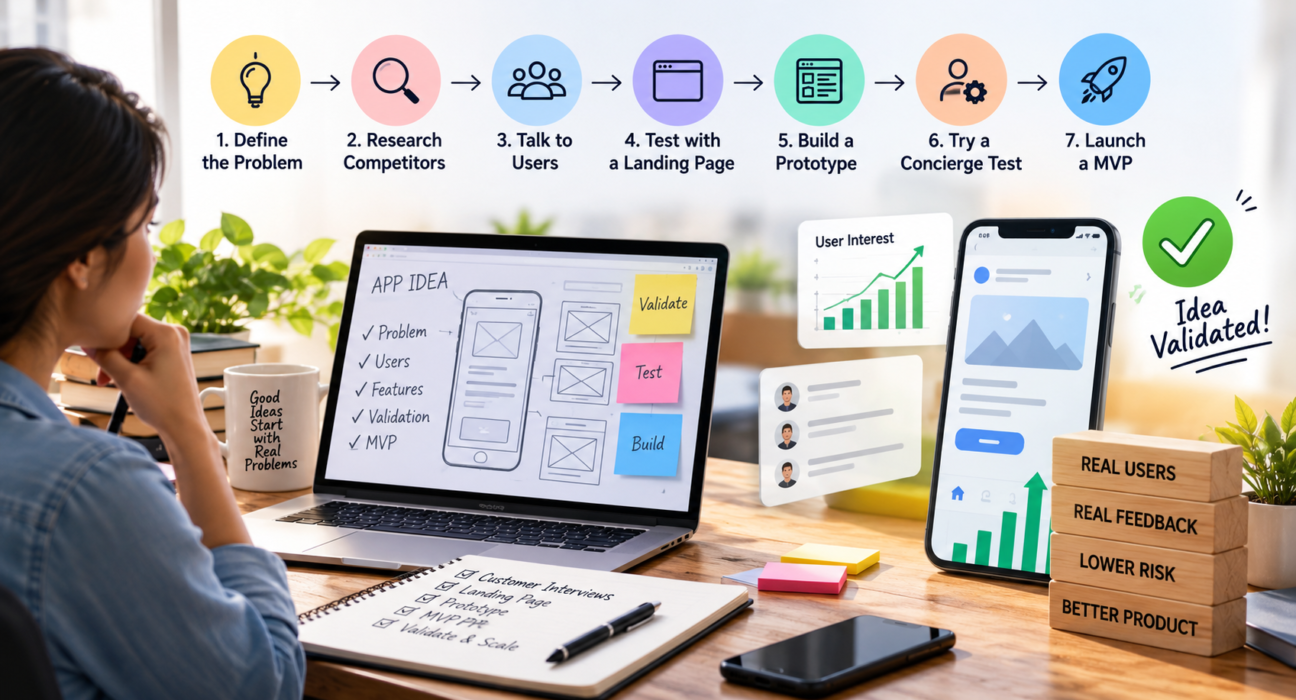
Step-by-Step Process for Mobile App Idea Validation
Step 1: Define the Problem and the User
Write one sentence describing the problem, and another describing who has it. For example: “Freelance designers struggle to track unpaid invoices across multiple clients.”
If you cannot describe the user specifically, the idea is not ready. “Everyone with a phone” is not an audience. Narrow it until you could realistically find twenty of these people this week.
Step 2: Research the Market and Competitors
Search the App Store and Google Play for apps that solve the same problem. Existing competitors are usually a good sign, since they show people are already looking for solutions. Look at:
- What the top apps do well and where they fall short
- Patterns in low-star reviews, which reveal unmet needs
- How they price and monetize
- How they describe themselves in their store listings
Then ask the harder question: what would make a user switch to you? If the only answer is “ours will be better,” keep digging for a sharper angle.
Step 3: Talk to Potential Users
Interviews are the most valuable validation activity, and they cost almost nothing. Aim for 10 to 20 conversations with people who match your target user.
Tips for useful interviews:
- Ask about their current behavior, not your idea. “How do you handle this today?” beats “Would you use an app that does this?”
- Ask about the last time the problem happened.
- Ask what they have already tried, including paid tools.
- Avoid pitching. Friendly people will say yes to be polite.
- Listen for strong emotion. Frustration signals a real problem.
Friends and family are poor sources, since they tend to be encouraging rather than honest. Look for strangers in communities, forums, social groups, and professional networks where your audience gathers.
Step 4: Test Demand with a Landing Page
A simple landing page can tell you whether people care enough to act. Describe the app’s main benefit, show a mockup, and add a call to action such as joining a waitlist or requesting early access.
Drive some traffic to it through social posts, communities, or a small ad budget. Then look at the conversion rate: how many visitors left their email. Compare it with your own expectations before launching, so you do not rationalize a weak result afterward.
Step 5: Build a Clickable Prototype
A prototype is an interactive mockup that looks and feels like the app but has no real code behind it. UI/UX tools let you create one in days.
Put it in front of five to ten target users and watch them use it. Note where they hesitate, what they tap by mistake, and what they ignore. Usability problems found here are cheap to fix.
Step 6: Try a Concierge or “Wizard of Oz” Test
Before automating anything, deliver the service manually. If your idea is a meal-planning app, create meal plans by hand for a small group and see whether they use and value them. If people will not use the manual version, an automated app is unlikely to change that.
Step 7: Launch a Minimum Viable Product (MVP)
If earlier steps look promising, build an MVP with only the features needed to solve the core problem. Release it to a limited group, then measure real behavior: do users come back, complete the key action, and recommend it?
Comparing the approaches helps you choose where to start:
| Validation Method | Typical Cost | Time Needed | What It Proves |
|---|---|---|---|
| User interviews | Very low | 1–2 weeks | The problem is real |
| Competitor research | Very low | A few days | Market demand and gaps |
| Landing page test | Low | 1–2 weeks | Interest in your solution |
| Clickable prototype | Low to moderate | 1–3 weeks | Usability and flow |
| Concierge test | Low | 2–4 weeks | Willingness to use the service |
| MVP | Moderate to high | Months | Real-world retention and value |
Costs and timelines vary by project, so treat these as relative guides rather than fixed numbers.
What Signals Show That Your App Idea Is Validated?
Look for behavior, not compliments. Strong signals include:
- Interviewees describe the problem in detail without being prompted
- People are already using workarounds or paying for partial solutions
- Waitlist sign-ups come from strangers, not only your network
- Prototype testers complete the main task and ask when they can get the app
- Early users return without reminders
- Some users are willing to pay or pre-commit
Weak signals include “great idea,” likes on a social post, and vague promises to try it later.
Common Mistakes in Mobile App Idea Validation
- Asking leading questions. “Wouldn’t it be great if…” produces biased answers.
- Validating with the wrong audience. Feedback from people who will never use the app is noise.
- Treating interest as demand. Clicking a link is easier than paying or changing habits.
- Ignoring negative feedback. Early criticism is the cheapest information you will get.
- Building too much too soon. A long feature list hides whether the core idea works.
- Skipping monetization checks. Even a free app needs a path to revenue, so test willingness to pay early.
How Do You Know When to Pivot or Stop?
If, after a reasonable number of interviews and tests, users do not feel the problem strongly, do not engage with your solution, or will not pay, you have three options: refine the audience, change the solution, or stop. Stopping after a few weeks of validation is a success, not a failure. You have saved the budget that development would have consumed.
Set your success criteria before you start. For example, decide in advance how many interviews should confirm the problem and what sign-up rate would count as encouraging. This keeps you honest when results come in.
Choosing a Development Partner After Validation
Once your idea is validated, the next decision is who will build it. Validation work makes this easier because you can share interview findings, prototypes, and a clear feature priority list with potential partners.
When comparing mobile app development companies, evaluate:
- Experience with apps similar to yours
- Their approach to MVPs and phased delivery
- Portfolio quality and client feedback
- Communication and project management process
- Technology expertise for iOS, Android, or cross-platform builds
- Transparency around pricing and timelines
Platforms like GoFirms can help you research and compare mobile app development and UI/UX design companies in one place, so you can build a shortlist before reaching out. Always speak directly with shortlisted companies and review their work before deciding.
[Internal Link Suggestion: Relevant GoFirms Page/Article] — mobile app development companies category page.
Frequently Asked Questions
How do I validate a mobile app idea for free?
Start with competitor research and user interviews, which cost only time. Read app store reviews to find gaps, talk to 10–20 target users, and post in relevant online communities. A free landing page builder and a basic prototype tool can extend your testing without any development spend.
How long does mobile app idea validation take?
Basic validation usually takes two to six weeks, depending on how easily you can reach your target users. Interviews and competitor research can be done in the first couple of weeks, while prototype testing and landing page experiments add more time. Launching an MVP takes longer.
How many people should I talk to when validating an app idea?
Ten to twenty interviews with people who match your target user is a practical starting point. Patterns often emerge within the first ten. If answers still vary widely, keep going or narrow your audience definition until responses become more consistent.
What is the difference between an MVP and a prototype?
A prototype is a non-functional, clickable mockup used to test design and user flow. An MVP is a working app with only core features, released to real users to test actual behavior. Prototypes come first and are cheaper, while MVPs require development effort.
Should I build an app before validating the idea?
No. Building first exposes you to the highest cost and risk. Validate the problem, audience, and solution through interviews, landing pages, and prototypes first. Development is best treated as the step you take once evidence supports it, not as a way to discover whether the idea works.
What are the best signals that an app idea will succeed?
The strongest signals are behavioral: strangers joining a waitlist, users completing key tasks in a prototype, people already paying for similar solutions, and early users returning on their own. Compliments and social media likes are weak indicators and should not drive your decision.
Can I validate an app idea without technical skills?
Yes. Interviews, competitor analysis, landing pages built with no-code tools, and clickable prototypes require no coding. You only need technical help when you move to an MVP, and by then you will have the evidence to explain what you need.
Conclusion
Mobile app idea validation protects your time and budget by testing the riskiest assumptions first: is the problem real, is your audience reachable, and will people use and pay for your solution. Work through interviews, competitor research, a landing page, a prototype, and finally a lean MVP, and judge each stage by what users do rather than what they say.
When your idea has proven itself, a clear brief and tested prototype make it easier to find the right partner. You can research and compare mobile app development and UI/UX companies through GoFirms to build your shortlist with confidence.