Introduction
Every PG or hostel owner has faced this moment: a bed sits empty for weeks, and nobody notices until the monthly rent numbers don’t add up. Vacant beds directly cut into revenue, yet many PG owners still rely on registers, WhatsApp messages, or memory to track who has moved in and who has moved out. This is where PG occupancy management becomes essential.
In this guide, you’ll learn what occupancy management actually involves, the metrics worth tracking, manual versus software-based tracking methods, and practical steps to reduce vacancy using a PG and hostel management software built for this purpose.
Why Occupancy Tracking Matters for PG Businesses
Occupancy is the single biggest driver of revenue in the PG and hostel business. A property with 40 beds running at 80% occupancy earns noticeably less than one running at 95%, even though the operating costs electricity, staff, maintenance remain nearly the same.
Poor occupancy tracking usually leads to:
- Beds staying vacant longer than necessary because no one flagged them
- Confusion over which rooms are actually available for new tenants
- Delayed follow-up with prospective tenants due to unclear vacancy data
- Inaccurate rent forecasting, since revenue depends on how many beds are filled
- Difficulty identifying which buildings or floors underperform
For owners managing more than one property, this problem multiplies quickly. Without a clear system, it becomes nearly impossible to know, at a glance, how many beds are vacant across all locations.
What Is PG Occupancy Management?
PG occupancy management is the process of tracking, updating, and analysing bed and room availability across a PG or hostel property to minimise vacancy and maximise rental income.
It typically involves recording tenant check-ins and check-outs, monitoring which beds are occupied versus vacant, and using that data to make decisions such as adjusting rent, prioritising marketing for empty rooms, or planning maintenance during low-occupancy periods.
Occupancy management is not just about counting empty beds. It connects directly to tenant management, rent collection, and reporting, since every bed’s status affects how much rent is due and from whom.
Key Metrics to Track for Occupancy Management
Before improving occupancy, owners need to track a few core numbers consistently.
Occupancy Rate
Occupancy rate shows what percentage of total beds are currently filled. Calculate it using this formula:
Occupancy Rate = (Occupied Beds ÷ Total Beds) × 100
For example, a property with 50 total beds and 44 occupied has an occupancy rate of 88%. Tracking this number weekly or monthly helps owners spot trends — a steady decline usually signals a problem worth investigating, such as pricing, location competition, or poor tenant experience.
Vacant Bed Count
This is simply the number of beds currently unoccupied, broken down by building, floor, or room. A single “total vacant beds” number is useful, but a breakdown by location is far more actionable, since it tells staff exactly where to focus efforts.
Bed Turnover Rate
This measures how often beds change hands over a given period. High turnover can indicate tenant dissatisfaction, while very low turnover in a growing city might suggest under-pricing. Either way, turnover data helps explain occupancy trends rather than just describing them.
Average Vacancy Duration
This tracks how long, on average, a bed stays empty before a new tenant moves in. A rising average vacancy duration is often the clearest early warning sign that occupancy is slipping.
How to Track PG Occupancy and Vacant Beds
There are two broad approaches: manual tracking and software-based tracking. Most PG businesses start with the manual method and move to software as the number of beds or properties grows.
Manual Tracking Methods
Manual tracking generally involves:
- Maintaining a register or spreadsheet listing every room and bed, updated whenever a tenant moves in or out.
- Physical inspection rounds, where a manager walks through the property to confirm which beds are actually occupied.
- Verbal or written handover notes between shifts or staff members about recent check-ins and check-outs.
- Manually updating rent records to reflect which tenants are currently active.
This approach can work for very small properties with one owner managing everything directly. However, it becomes error-prone and time-consuming once a property crosses 15–20 beds, or when an owner manages multiple buildings.
Software-Based Tracking
Software-based occupancy tracking replaces registers and spreadsheets with a centralised digital system. Typically, this involves:
- Digitising the property structure buildings, floors, rooms, and beds into the software as a one-time setup.
- Recording tenant check-in and check-out directly in the system, which automatically updates bed status.
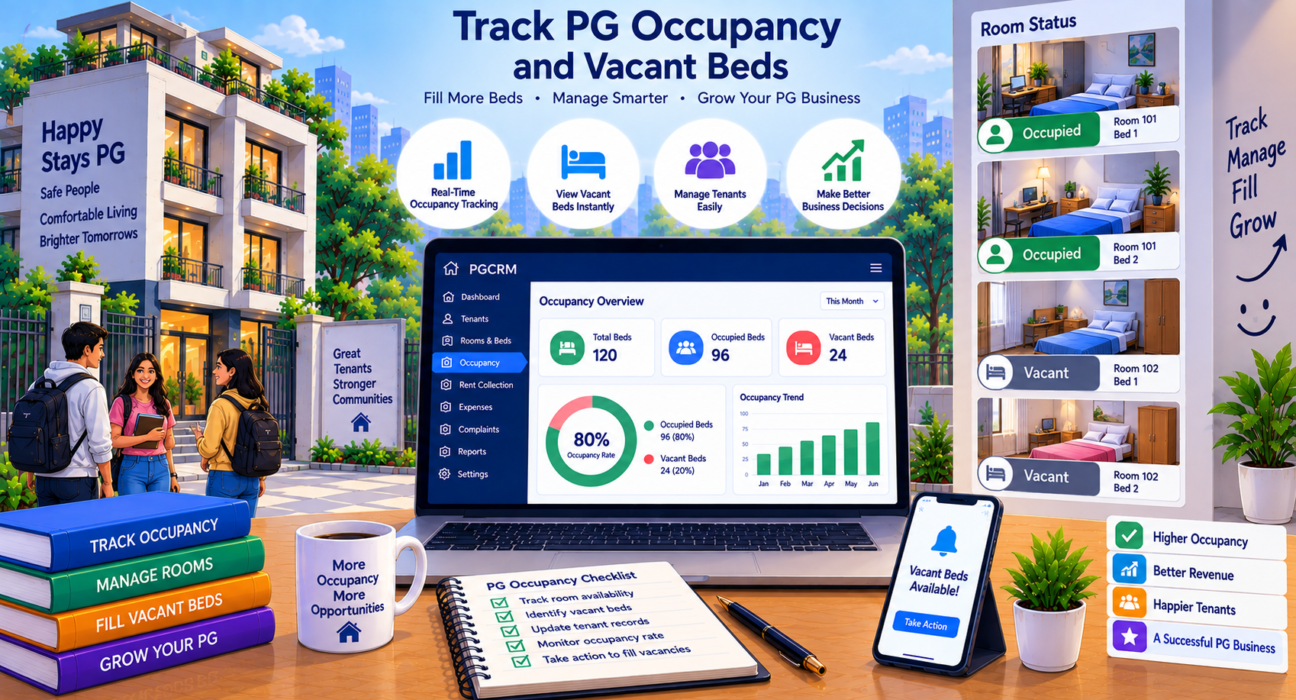
- Viewing real-time occupancy data on a dashboard instead of manually counting beds.
- Generating occupancy and vacancy reports without recalculating numbers by hand.
- Linking occupancy data to rent tracking, so vacant beds and pending rent are visible together.
This method reduces human error and gives owners an accurate, real-time picture of occupancy without physically visiting every room.
Manual vs Software-Based Occupancy Tracking
| Aspect | Manual Tracking | Software-Based Tracking |
|---|---|---|
| Accuracy | Prone to human error and outdated records | Updated in real time as tenants check in/out |
| Multi-property visibility | Difficult; requires separate records per property | Centralised view across all buildings |
| Time required | High; needs manual counting and updating | Low; automated once data is entered |
| Reporting | Manual calculation of occupancy rate | Instant reports and summaries |
| Scalability | Becomes unmanageable beyond a few properties | Scales easily with more rooms and beds |
How PG Occupancy Management Software Helps
A dedicated PG management system doesn’t just show which beds are vacant; it connects occupancy data with the rest of daily operations. Using PG management software such as PGCRM can help owners centralise building, room, and bed information alongside tenant records, rent tracking, and complaint management, so occupancy isn’t tracked in isolation from the rest of the business.
Some practical ways this helps day-to-day operations include:
- Centralised property information: The system organises buildings, rooms, and beds in one place instead of scattering them across notebooks or spreadsheets.
- Real-time occupancy visibility: Owners and managers can see occupied and vacant beds without a physical walkthrough.
- Faster tenant onboarding: When a bed becomes vacant, staff can quickly identify it and move a new tenant in without confusion.
- Rent tracking tied to occupancy: Since occupancy and rent are connected, it’s easier to see which vacant beds are also affecting monthly rent collection.
- Reports and analytics: Owners can review occupancy trends over time instead of relying on guesswork.
For owners managing multiple PGs or hostels, this kind of centralised tracking is particularly valuable, since it removes the need to cross-check separate records for each property.
Best Practices for Managing Vacant Beds
Tracking vacancy is only useful if it leads to action. A few practical habits help reduce vacant bed duration:
- Review occupancy weekly, not just at month-end, so vacant beds are identified quickly.
- Set a target occupancy rate for each property and track performance against it.
- Flag long-vacant beds separately, since a bed empty for two months needs different attention than one vacant for two days.
- Coordinate move-out notice periods with move-in planning, so a new tenant is ready before the current one leaves.
- Use occupancy data to guide pricing, especially in buildings or floors with consistently higher vacancy.
- Keep tenant records updated immediately after check-in or check-out to avoid relying on memory later.
These habits work whether an owner uses a register or software, but they become significantly easier to maintain with a PG occupancy management system that updates occupancy automatically.
FAQ
What is PG occupancy management?
PG occupancy management is the process of tracking how many beds in a PG or hostel are occupied versus vacant, and using that data to reduce vacancy, plan tenant onboarding, and improve rental income. It typically covers tracking check-ins, check-outs, and current bed status across a property.
How is PG occupancy rate calculated?
Calculate occupancy rate by dividing the number of occupied beds by the total number of beds, then multiplying by 100. For example, 44 occupied beds out of 50 total beds gives an 88% occupancy rate. Tracking this regularly helps identify occupancy trends over time.
Can I track PG occupancy manually without software?
Yes, small properties can track occupancy using a register or spreadsheet updated whenever a tenant moves in or out. However, manual tracking becomes harder to manage accurately as the number of beds or properties increases, since it relies heavily on consistent manual updates.
Why do vacant beds go unnoticed for a long time?
Vacant beds often go unnoticed when tracking isn’t centralised or updated in real time. When occupancy records live scattered across notebooks, spreadsheets, or verbal handovers, staff can easily miss a vacant bed until someone manually reviews the entire property.
How does occupancy tracking help with rent collection?
Occupancy tracking shows exactly which beds are occupied and by whom, which makes it easier to match rent due against actual tenants. This reduces confusion around rent for vacant beds and helps owners spot mismatches between occupancy and rent records early.
How often should PG owners review occupancy data?
Reviewing occupancy weekly is generally more effective than only checking at month-end, since it allows owners to spot vacant beds and act on them quickly. Properties with frequent tenant turnover may benefit from even more frequent reviews.
Does occupancy management software work for multiple PG properties?
Yes, software-based occupancy tracking is particularly useful for owners managing multiple buildings or PGs, since it consolidates room and bed data from all properties into a single dashboard, removing the need to check separate records for each location.
Conclusion
Tracking PG occupancy and vacant beds isn’t just an administrative task; it directly affects how much revenue a property generates each month. Whether through a well-maintained register or a dedicated system, the goal is the same: know exactly which beds are occupied, which are vacant, and how long vacancies last, so action can be taken quickly. As a property grows beyond a handful of beds, manual tracking tends to break down, making a centralised approach increasingly valuable. Explore PGCRM to simplify your PG and hostel management, with occupancy, tenant, and rent information organised in one place.