How to Use a Field Team Leaderboard to Improve Accountability
When your team is spread across cities, routes, and customer sites, accountability gets hard to see. Managers hear about visits through WhatsApp messages and end-of-day calls, and good performers get the same attention as people who barely meet targets.
A field team leaderboard fixes part of this problem. It turns raw activity data into a transparent, ranked view of who is doing what, so everyone knows what “good” looks like.
This guide covers what a field team leaderboard is, which metrics belong on it, how to set one up step by step, and the mistakes that make leaderboards backfire.
What Is a Field Team Leaderboard?
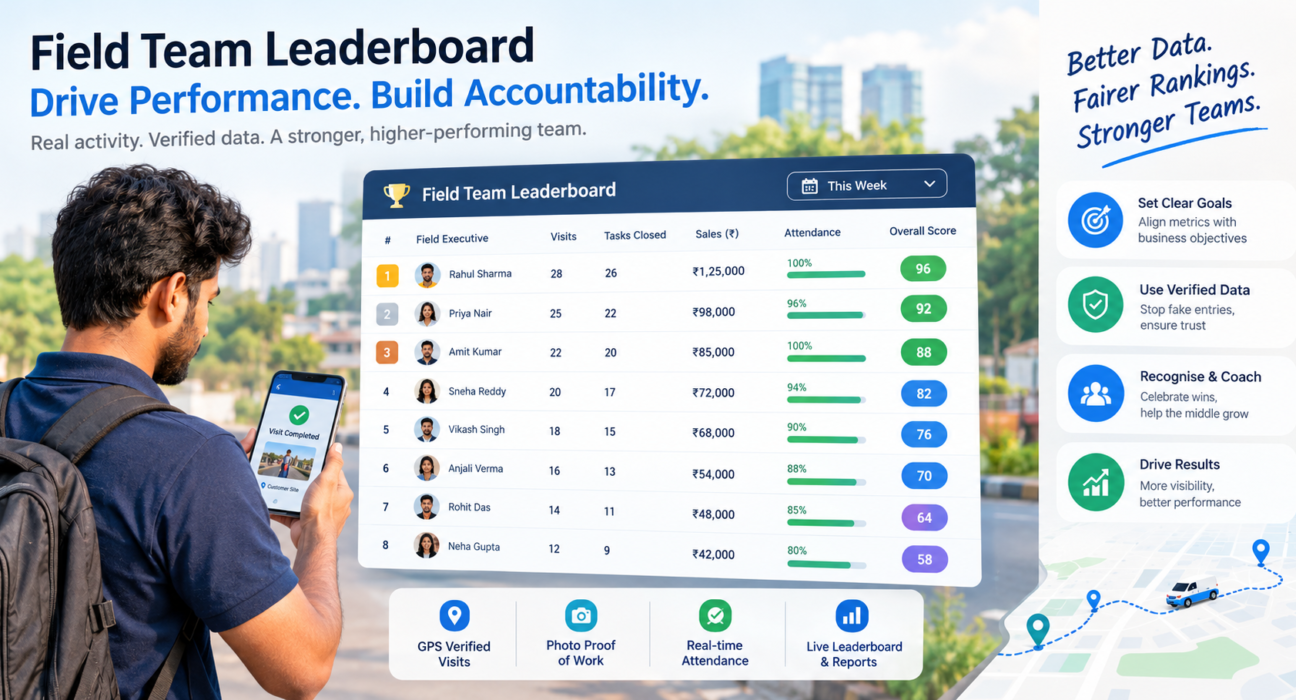
A field team leaderboard is a ranked view of field employees based on measurable performance metrics such as visits completed, tasks closed, attendance, sales, or collections. It is usually updated daily, weekly, or in real time, and it is visible to managers and sometimes to the whole team.
Unlike a monthly performance report, a leaderboard is continuous and comparative. Reps see where they stand while there is still time to change the outcome.
Why Leaderboards Support Accountability
Accountability needs three things: clear expectations, visible results, and consequences, both positive and corrective. A leaderboard supports the first two directly.
- Clear expectations: Everyone sees which metrics count.
- Visible results: Performance is public data, not a manager’s impression.
- Fair recognition: Top performers get credit based on numbers, not favouritism.
- Faster coaching: Managers spot slipping reps early instead of at the quarter-end review.
Why Field Teams Struggle With Accountability
Field work is hard to supervise by nature. Common problems include:
- No proof of work: A rep says they visited a customer, but nobody can verify it.
- Scattered data: Attendance is on paper, visit notes are on chat apps, and expenses are in spreadsheets.
- Inconsistent targets: Different managers measure different things, so comparisons feel unfair.
- Delayed feedback: Problems surface weeks later, when they are hard to correct.
A leaderboard is only as honest as the data behind it. If activity is self-reported, the ranking will reflect who reports best, not who works best. That is why leaderboards work best alongside verified data such as GPS-stamped attendance and visit proof.
Which Metrics Should a Field Team Leaderboard Track?
Choose three to five metrics tied directly to your business goals, and mix activity metrics with outcome metrics. Activity shows effort, and outcomes show results.
| Metric Type | Example Metrics | What It Reveals |
|---|---|---|
| Attendance | On-time punch-ins, days present | Discipline and reliability |
| Activity | Visits completed, tasks closed, calls made | Effort and coverage |
| Quality | Checklist completion, customer feedback, SLA adherence | How well work is done |
| Outcome | Orders booked, sales value, collections recovered | Business impact |
| Efficiency | Visits per day, travel time, route adherence | Productivity |
Match Metrics to Your Industry
The right mix depends on the role:
- Sales and distribution teams: visits per day, orders booked, beat coverage
- Field service teams: jobs closed, SLA compliance, repeat visits avoided
- Collections teams: amount recovered, receipts captured, follow-ups completed
- Merchandising and audit teams: outlets covered, audit forms submitted
Ranking everyone on a single metric like sales value alone is a common error. It rewards territory luck and ignores quality, so combine metrics or run separate boards.
How to Set Up a Field Team Leaderboard: Step by Step
- Define the goal. Decide what you want to improve, such as visit coverage, SLA compliance, or collections.
- Pick 3–5 metrics. Keep the board simple enough that a rep can explain how to climb it.
- Set fair targets. Adjust for territory size, role, and seniority so comparisons are meaningful.
- Make sure the data is verified. Use GPS-based attendance, geofenced visits, and proof capture so rankings can’t be gamed.
- Choose a time frame. Daily boards drive urgency, weekly boards suit most teams, and monthly boards reward consistency.
- Decide who sees what. Share team-level rankings openly if your culture supports it, and keep individual coaching details private.
- Link it to action. Use the board in team huddles, recognition, and one-on-one coaching.
- Review and refine. If the board rewards the wrong behaviour, change the metrics.
How to Use the Leaderboard to Improve Accountability
Publishing a ranking is only the start. Accountability improves when the leaderboard feeds regular management habits.
Run Short, Data-Based Review Meetings
Open weekly meetings with the board. Ask what the top performers are doing differently and what is blocking people in the middle. The aim is shared learning, not public embarrassment.
Coach the Middle, Not Just the Extremes
The top and bottom ranks get the most attention. The largest gain is usually in the middle, where a small change in visit planning or follow-up discipline can move a rep up several places.
Recognise Consistency as Well as Peaks
If only the top three get credit, everyone else disengages. Add categories such as “most improved,” “best on-time attendance,” or “highest SLA compliance” so different strengths get noticed.
Pair Visibility With Support
A rep ranked low may have a harder territory, a longer travel route, or a skill gap. Check the cause before judging. A leaderboard should start a conversation.
Common Leaderboard Mistakes to Avoid
- Ranking on one metric only, which encourages shortcuts.
- Using unverified data, which invites fake entries and kills trust.
- Ignoring territory differences, which makes the competition feel unfair.
- Using it only to punish, which turns the board into a source of fear.
- Changing metrics too often, which confuses the team.
- Setting it up and forgetting it, which makes it background noise within weeks.
Team culture matters too. Some teams respond well to open competition, and others do better with team-level or personal-best boards. Know your team before choosing.
How Software Makes Field Team Leaderboards Practical
Building a leaderboard by hand means collecting data from chat messages, spreadsheets, and call logs, then ranking it manually every week. By the time it is ready, the information is stale and open to dispute.
Field force management software solves this by capturing data at the source:
- Automated data capture: Attendance, visits, tasks, and outcomes are recorded as work happens.
- Verified activity: GPS stamps, geofencing, and visit proof make it harder to inflate numbers.
- Real-time updates: Rankings refresh as work is completed, so feedback is immediate.
- One source of truth: Managers and reps see the same numbers, which reduces disputes.
How FieldExecutives Supports Leaderboard-Driven Accountability
Businesses looking to simplify these processes can use field force management software such as FieldExecutives. It captures field activity in one system and gives managers real-time KPIs and leaderboards through its web console.
Features that support accountability include:
- Verified attendance: Server-time punch-ins, geofencing, and mock-location detection support dependable attendance data.
- Proof of visit: Photo, signature, and OTP capture show what was done at each stop.
- Live visibility: A live map and GPS trail show where the team is during the day.
- SLA monitoring: Service teams can track whether jobs meet their timelines.
- KPI targets and reports: Admins can set KPI targets, and managers can review performance through reports and leaderboards.
- Expense and collection tracking: Money-related activity is recorded in the same system.
Because the data comes from verified field activity, the rankings are based on records that managers and reps can both trust. Your KPIs will depend on your team’s workflow, so confirm how your own metrics map to the platform during a demo.
Conclusion
A field team leaderboard can make accountability visible, fair, and continuous. It works best when you choose a few meaningful metrics, base them on verified data, and use the rankings to coach and recognise people instead of only ranking them.
Start small. Pick one goal, three metrics, and a weekly review rhythm. Then improve the board as your team learns what motivates them. If you want to automate the data collection and keep the rankings trustworthy, a field force management platform such as FieldExecutives can do the heavy lifting.