How to Manage Field Employee Training and Skill Development
Training a team that spends its day at customer sites, on the road or in the market is harder than training an office team. There is no shared classroom, attendance is difficult to verify, and managers rarely see how new skills show up in real visits. That is why many businesses look at field employee training management software to run training in a structured, measurable way.
This guide covers how to plan field training, which skills matter, how to track progress, and what to look for in software. It also explains where a field force management platform like FieldExecutives fits in.
What Is Field Employee Training Management?
Field employee training management is the process of planning, delivering, tracking and improving the skills of employees who work outside a fixed office. That covers sales reps, service technicians, delivery staff, collection agents and merchandisers.
It goes beyond a one-time induction. It includes onboarding, product and process training, refreshers, on-the-job coaching and ongoing skill assessment, all tied to real field performance.
Why Field Training Is Harder Than Office Training
Field teams face problems that classroom-style programmes don’t solve:
- Scattered workforce. Reps work across cities, territories and routes, so gathering everyone is expensive and disruptive.
- Training competes with targets. A day in a workshop is a day without visits, so training often gets postponed.
- Little visibility. Managers can’t easily tell who completed training, who understood it, or who applies it in the field.
- Inconsistent quality. Each manager coaches differently, so process knowledge varies from team to team.
- Poor connectivity. Training that needs a stable internet connection fails in areas with weak networks.
These challenges are why field training needs a system, not just occasional sessions.
Which Skills Should You Develop in Field Teams?
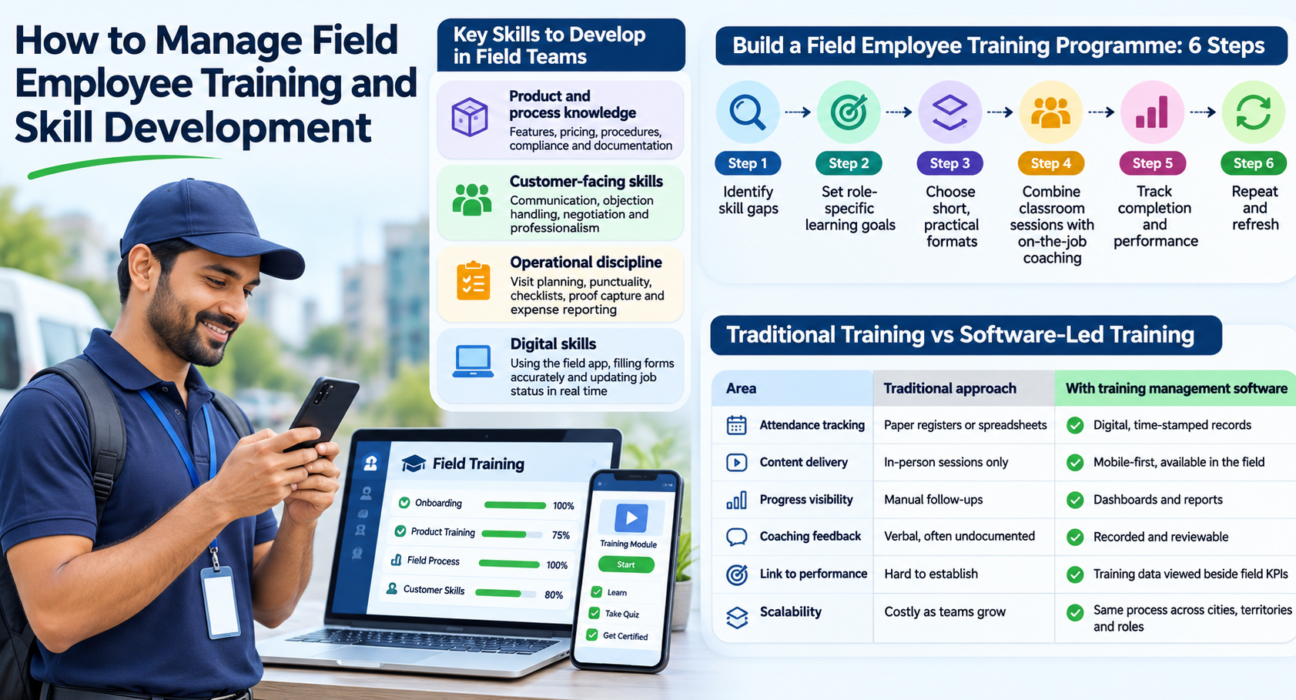
Start with the skills that most directly affect your results. For most field teams, they fall into four groups:
- Product and process knowledge: features, pricing, service procedures, compliance rules and documentation steps.
- Customer-facing skills: communication, objection handling, negotiation, conflict resolution and professionalism at customer sites.
- Operational discipline: visit planning, punctuality, checklist completion, proof capture and expense reporting.
- Digital skills: using the field app correctly, filling forms accurately and updating job status in real time.
Not every team needs all four at the same depth. A pharma rep needs strong product knowledge, while a field service technician needs procedure accuracy and safety discipline.
How to Build a Field Employee Training Programme: 6 Steps
To build an effective field training programme, identify skill gaps, set clear goals, choose short learning formats, train on the job, measure results and repeat the cycle. Here is how each step works.
Step 1: Identify Skill Gaps
Look at what your existing data already tells you. Missed visits, repeated customer complaints, low conversion rates, failed SLAs and incomplete forms all point to specific skill gaps.
Ask managers which mistakes they correct most often. Those answers usually give you your first training priorities.
Step 2: Set Role-Specific Learning Goals
A new joiner and a senior rep don’t need the same training. Define what “competent” looks like for each role, and write it as something observable, such as “completes the visit checklist with photo proof on every stop.”
Step 3: Choose Short, Practical Formats
Field employees learn best in short, practical bursts. Long lectures lose people quickly.
- Short task-based modules a rep can finish between visits
- Checklists that walk through a procedure step by step
- Quick knowledge checks after each module
- Short calls or huddles for product updates
Step 4: Combine Classroom Sessions with On-the-Job Coaching
Use classroom or virtual sessions for foundations, then reinforce them through coaching during real work. A manager or senior colleague joining a few visits and giving feedback is often more effective than a second workshop.
Step 5: Track Completion and Performance
Training only matters if it changes behaviour. Track two things together:
- Training activity: who attended, who completed assigned tasks, who passed assessments.
- Field performance: visits completed, conversion, SLA adherence, form accuracy and customer feedback.
Comparing the two shows which training actually works.
Step 6: Repeat and Refresh
Products, prices, regulations and processes change. Schedule refreshers, update content when something changes, and re-check skill gaps every quarter.
Traditional Training vs Software-Led Training
| Area | Traditional approach | With training management software |
|---|---|---|
| Attendance tracking | Paper registers or spreadsheets | Digital, time-stamped records |
| Content delivery | In-person sessions only | Mobile-first, available in the field |
| Progress visibility | Manual follow-ups | Dashboards and reports |
| Coaching feedback | Verbal, often undocumented | Recorded and reviewable |
| Link to performance | Hard to establish | Training data viewed beside field KPIs |
| Scalability | Costly as teams grow | Same process across cities and teams |
What to Look for in Field Employee Training Management Software
Good field employee training management software lets you assign learning, track completion, measure performance and work reliably in low-network areas. Use this checklist when evaluating options:
- Mobile-first, offline-capable app. Field staff must be able to access and complete tasks without a constant connection.
- Task and checklist assignment. Managers should be able to assign training activities with deadlines and priorities.
- Custom forms and assessments. You need to create quizzes, observation checklists and feedback forms that match your processes.
- Verified attendance. For in-person sessions, location-verified attendance prevents proxy check-ins.
- Real-time reporting. Managers need to see completion and performance without chasing people.
- Link to field activity data. The strongest insight comes from seeing training next to visits, SLAs and sales outcomes.
- Multi-language support. Teams across regions learn better in their preferred language.
- Easy rollout. Complex tools slow adoption. Simple setup and a clear app matter more than a long feature list.
Dedicated LMS vs Field Force Management Platform
A learning management system (LMS) is built for course content, certifications and structured curricula. A field force management platform is built to run and monitor field work: attendance, visits, tasks, proof and KPIs.
The two solve different problems. If you need a large library of formal courses, an LMS may be the right primary tool. If your main need is operational training, process adherence and on-the-job skill tracking tied to field performance, a field force management platform can cover much of it. Many businesses use both, with the field platform showing whether training is changing field behaviour.
How FieldExecutives Can Support Field Training and Skill Development
Businesses looking to simplify these processes can use field force management software such as FieldExecutives. It is not a content-heavy LMS, but it provides the operational tools that make field training measurable and practical.
Here is how its supported features map to training needs:
- Tasks with checklists, priority and SLA. Managers can assign training activities or practice assignments to specific reps and track completion.
- Custom forms builder. Build observation checklists, knowledge checks and coaching feedback forms without writing code.
- Proof capture. Photo, signature, OTP and checklist capture can confirm that a procedure was actually followed on site.
- Geofenced attendance. Server-time punch-ins and geofencing help verify attendance at training sessions held at a location.
- Real-time KPIs and leaderboards. Managers can compare performance across reps and see where coaching is needed.
- Offline-first mobile app. Reps can capture data and complete tasks without a network, and everything syncs on reconnection.
- In-app messaging and activity feed. Managers can share updates and follow-up instructions with the team.
- Multi-language support. The app supports Hindi, English and regional languages.
Because these tools sit in the same platform as visits, SLAs, expenses and collections, you can connect a training effort to its effect on field results. For example, you can run a focused refresher on a visit checklist and then watch form completion and SLA numbers for the same team.
[Internal Link Opportunity: FieldExecutives features page]
Best Practices for Field Skill Development
- Keep modules short. Aim for activities a rep can complete in a few minutes.
- Train on real scenarios. Use actual customer situations, forms and procedures from your operations.
- Make managers coaches. Give team leads simple observation forms so coaching is consistent and recorded.
- Recognise progress. Use leaderboards and recognition to motivate, not just to monitor.
- Review data monthly. Look at skill gaps, completion rates and performance trends together.
- Start small. Pilot with one team or one skill, measure the result, then expand.
How to Measure Whether Training Is Working
Pick a few metrics before you start, and compare them before and after training:
- Task or module completion rate
- Visit completion and checklist accuracy
- SLA adherence for service teams
- Conversion or order values for sales teams
- Customer feedback scores
- Rework or error rates in forms and reports
Use your own baseline rather than industry averages. Your numbers are the most reliable measure of whether your training is working.
Conclusion
Managing field employee training and skill development means finding skill gaps, setting role-specific goals, using short practical formats, coaching on the job and measuring results against real field performance. Without a system, this is hard to sustain across a distributed team.
The right field employee training management software gives managers visibility, gives reps training they can use in the field, and links learning to results. FieldExecutives helps by providing tasks, checklists, custom forms, proof capture, geofenced attendance and real-time KPIs in one platform, so training becomes part of daily field operations.