Excel vs Field Force Management Software: Which Is Better for Field Teams?
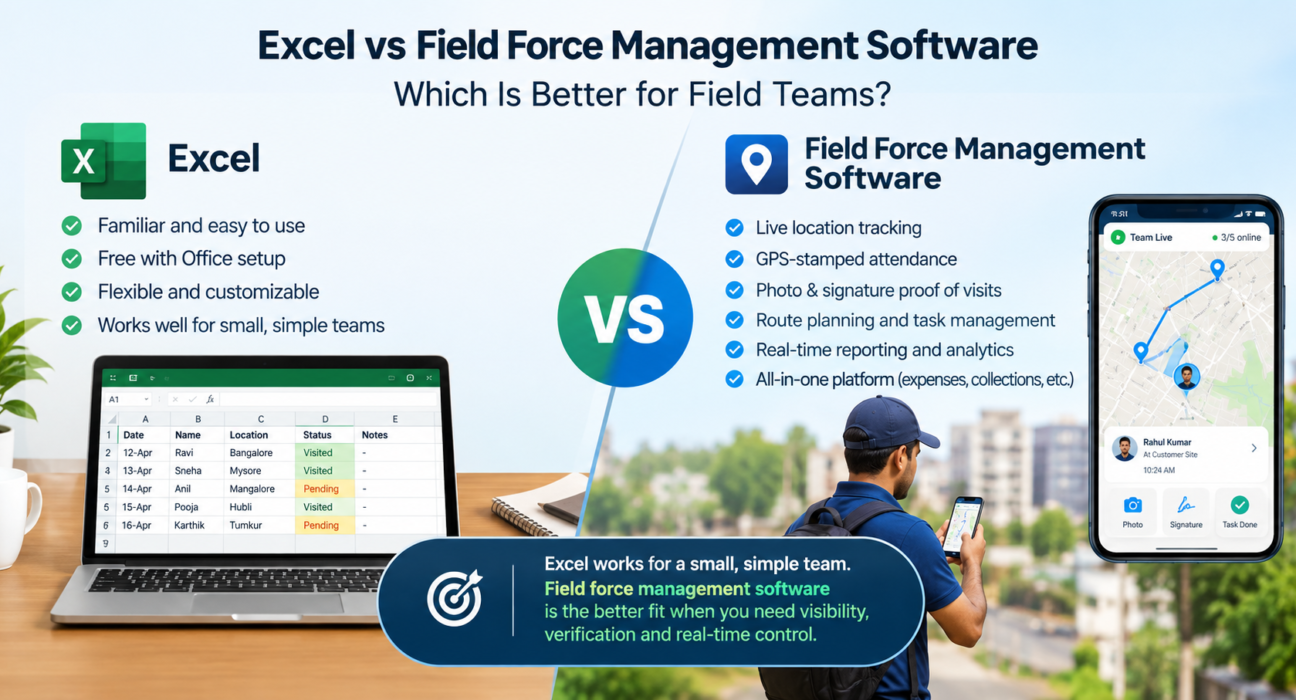
Short answer: Excel works for a small field team with simple, low-risk work. Once you need live location, verified attendance, proof of visits and real-time reporting, field force management software is the better fit.
Most field teams start with a spreadsheet. It’s familiar, free with your existing Office setup and flexible. Then the team grows, the sheet gets a dozen tabs, and updates arrive on WhatsApp. Managers spend their mornings collating reports instead of coaching people.
This guide compares Excel and field force management software across the areas that matter: visibility, attendance, visit verification, routes, expenses and reporting. It also helps you decide when Excel is still enough and when it’s costing you more than it saves.
What Is Field Force Management Software?
Field force management software is a platform that helps businesses assign, track, verify and analyze the work of employees who operate outside the office. It typically combines GPS tracking, attendance, task assignment, visit proof, route planning, expense handling and reporting in one system.
Excel is a general-purpose spreadsheet. It stores and calculates data well, but it doesn’t know where your people are or what they did unless someone types it in.
Where Excel Works for Field Teams
Excel isn’t a bad tool. It works well when:
- The team is very small, for example a handful of people.
- Work is simple and doesn’t need proof or real-time visibility.
- Reporting happens weekly or monthly, not daily.
- You’re testing a process before investing in software.
For these teams, a well-built spreadsheet is a sensible starting point. The problems begin as complexity grows.
Where Excel Breaks Down for Field Teams
1. It has no live visibility
A spreadsheet only shows what someone last entered. You can’t see who is at a customer site, who is in transit and who hasn’t started. Once your team leaves the office, you’re relying on phone calls and self-reported updates.
2. Attendance is easy to manipulate
Attendance typed into a sheet is only as reliable as the person typing it. There’s no location stamp, no server timestamp and no check against a customer site. This is one of the most common reasons managers look for alternatives.
3. There’s no proof a visit happened
Excel can record “Visited ABC Traders, 11:15 AM.” It can’t confirm that the rep was there, capture a photo or signature, or stop a job from closing without evidence.
4. Data entry is manual and repeated
Reps report on WhatsApp, supervisors copy those messages into Excel, and someone consolidates the sheets at month-end. Every handoff adds delay and the chance of error.
5. Version control becomes a problem
Multiple people editing multiple copies leads to conflicting numbers. Ask three managers for last week’s visit count and you may get three answers.
6. Routes and beats are planned by hand
Sorting stops by area in a spreadsheet takes time, and it doesn’t account for distance or travel time between stops.
7. Expenses and collections stay disconnected
Receipts, mileage claims and payments collected in the field usually live in separate sheets. Tracing a claim from submission to approval to payment takes manual follow-up.
Excel vs Field Force Management Software: Comparison Table
| Capability | Excel | Field Force Management Software |
|---|---|---|
| Live location of field staff | No | Yes, on a real-time map |
| Attendance verification | Manual entry | GPS-stamped, geofenced punch-ins |
| Proof of visit (photo, signature, OTP) | No | Yes, can be required before a job closes |
| Task assignment | Manual, via messages | Assigned and delivered to the rep’s phone |
| Route and beat planning | Manual sorting | Route planning tools |
| Works offline in the field | Limited | Depends on the product; offline-first apps sync later |
| Expense and collection tracking | Separate sheets | Workflow-based, in one system |
| Reporting | Built manually | Real-time dashboards and KPIs |
| Setup cost | Low | Subscription |
| Best for | Small, simple teams | Growing or accountability-driven teams |
What to Compare Before You Choose
Ask these questions about your own operation:
- Can I see where my team is right now? If not, you have a visibility gap.
- How do I know a visit really happened? If the answer is “the rep told me,” you have a verification gap.
- How long does reporting take? If someone spends hours each week compiling it, you have an efficiency gap.
- What happens when the team doubles? If the spreadsheet won’t survive that, you have a scalability gap.
- Where does money get lost? Missed visits, unverified expenses and delayed collections all show up here.
If you answered “no” or “I’m not sure” to two or more, it’s worth evaluating dedicated software.
When Should You Switch From Excel?
You should switch from Excel to field force management software when you can no longer verify field activity, when reporting takes more time than acting on the data, or when errors start affecting customers, collections or payroll.
Common warning signs:
- Managers spend hours each week consolidating reports.
- Reps disagree with attendance or incentive calculations.
- You can’t tell which visits were skipped or delayed.
- Customer complaints arrive before you know a visit was missed.
- Expense claims take too long to reconcile.
- Different managers keep their own versions of the same data.
How Field Force Management Software Improves Field Operations
Real-time visibility
A live map replaces guesswork. You can see who has punched in, who is on the road and who is at a customer location, which helps you reassign work when plans change.
Verified attendance
Server-time punch-ins, geofencing and mock-location checks reduce the chance of fake attendance. This protects honest employees as much as it protects the business.
Proof of presence and proof of work
Photos, signatures, OTPs and checklists give you evidence of what happened at each stop. That helps with customer disputes, audits and SLA reviews.
Smarter planning
Route and beat planning reduce time spent on the road. Better sequencing means more time with customers.
Connected expenses and collections
When claims and collections sit in the same system as visits, you can trace each rupee back to the visit that produced it.
Reporting you can act on
Dashboards replace month-end spreadsheets. Managers see visit counts, SLA status and team performance while there’s still time to respond.
How to Move From Excel to Field Force Management Software
You don’t need to switch everything at once.
- List your current processes. Note what you track in Excel today: attendance, visits, tasks, expenses, collections.
- Identify the biggest gap. Start with the problem that costs the most, often attendance or visit verification.
- Define your workflows. Write down job types, checklists, approvals and SLAs so they can be configured in the new system.
- Clean your data. Prepare your team roster, customer list and territories.
- Run a pilot. Start with one team or region for a couple of weeks.
- Train the field team. Keep the mobile flow simple: punch in, follow the job card, capture proof.
- Retire the old sheets. Once the new process is stable, stop maintaining parallel spreadsheets so there’s a single source of truth.
How FieldExecutives Can Help
Businesses looking to simplify these processes can use field force management software such as FieldExecutives, a platform built for managing field employees and field operations.
Based on the FieldExecutives website, the platform covers:
- Live GPS tracking on a single team map.
- Geofenced attendance with server-time punch-ins and mock-location detection.
- Proof of visit through photo, signature and OTP capture.
- Task and job assignment with checklists and SLA timers.
- AI-based route and beat-plan optimization.
- Expense claims and collection tracking with an approval workflow.
- Custom forms and workflows configured without code.
- Real-time KPIs and reports for managers and owners.
- Offline-first mobile capture that syncs when connectivity returns.
The platform is designed for teams in logistics, FMCG and distribution, pharma, banking and collections, telecom, facility management, retail and field service. If your team uses Excel today, you can replace scattered spreadsheets and messaging groups with one connected system. Savings such as reduced travel time depend on your operation and aren’t guaranteed.
Conclusion
Excel is a fine starting point for small, simple field teams. But once you need to know where people are, prove that visits happened, verify attendance and see performance in real time, a spreadsheet becomes a bottleneck.
Field force management software closes those gaps by connecting tracking, tasks, proof, routes, expenses and reporting in one place. The right time to switch is before manual reporting and unverified data start costing you customers or revenue.
If you’re ready to see what that looks like for your team, explore FieldExecutives or book a demo to walk through your own workflow.