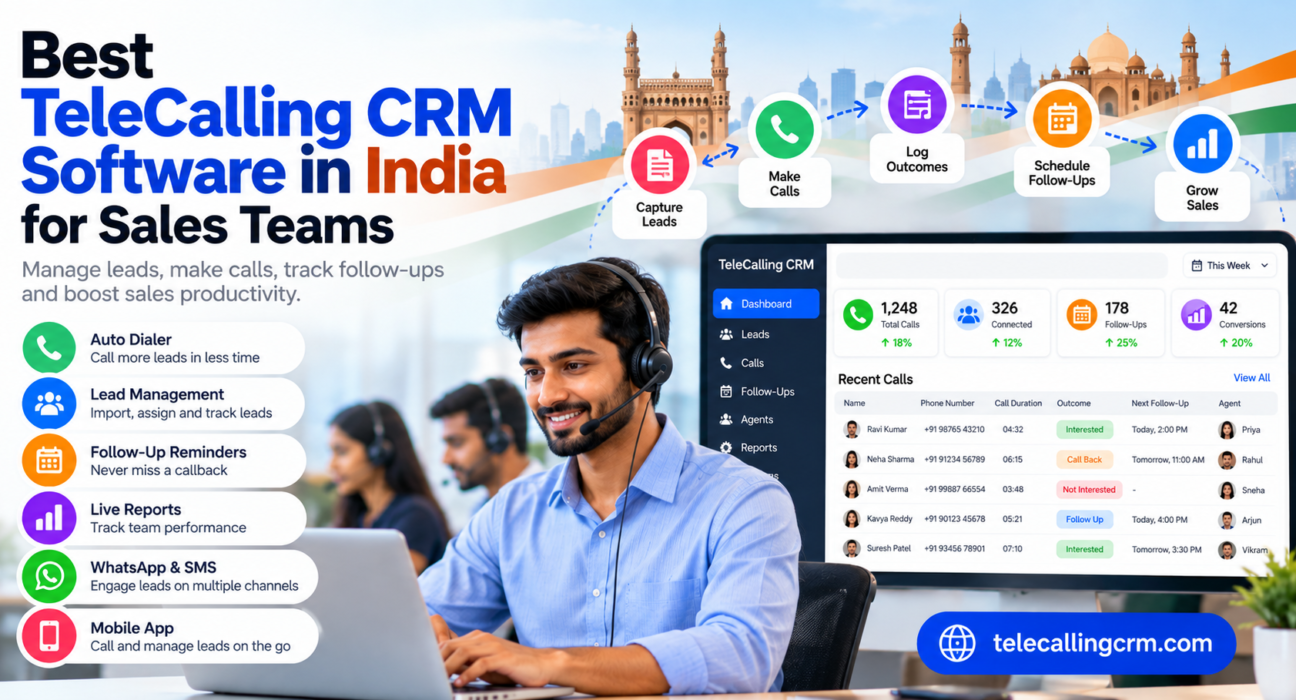
Best TeleCalling CRM Software in India for Sales Teams
Search for the best telecalling CRM and you will find a dozen “top 10” lists, each ranking a different tool first. That is because the right choice depends on how your team calls, how many leads you handle and what you can spend. This guide helps you shortlist the right telecalling CRM software for your sales team, with a simple method to test your options before paying.
Disclosure: this blog is published by TeleCalling CRM. We mention our own product where relevant, but the selection criteria below apply to any tool.
What Is the Best Telecalling CRM Software in India?
There is no single best telecalling CRM for every team. The best choice is the one that matches your calling method (SIM-based or cloud telephony), team size, lead sources, budget and reporting needs. Small and mid-size Indian teams often start with a SIM-based telecalling CRM. Larger or inbound-heavy teams may need cloud telephony or a broader sales platform.
What Telecalling CRM Software Should Do
Whatever the brand, a good telecalling CRM should cover these basics:
- Import and store leads, with duplicate checks
- Assign leads to agents by clear rules
- Let agents call quickly, ideally through an auto dialer
- Log call outcomes, notes and duration
- Schedule follow-ups and send reminders
- Show managers live and historical reports
- Work on mobile for field and remote agents
If a tool misses several of these, it is probably a generic CRM or a plain dialer, not a complete telecalling CRM.
Types of Telecalling CRM Software in India
Most tools fall into four groups. Knowing the group is more useful than comparing long feature lists.
| Type | How it works | Best for | Watch out for |
|---|---|---|---|
| SIM-based telecalling CRM | Agents call from their own phones using a SIM, and the app logs the calls | Small and mid-size outbound teams, remote or field teams | Depends on phone and SIM setup; check call logging on your agents’ devices |
| Cloud telephony-based CRM | Calls go through a virtual number or cloud platform | Teams needing IVR, call routing or inbound handling | Extra telephony costs and more setup |
| General sales CRM with calling integration | A broad CRM connects to a separate calling tool | Longer sales cycles, marketing plus sales workflows | Calling is often an add-on; cost and complexity can grow |
| Contact centre suite | Full inbound and outbound platform with queues and routing | Large call centres and BPOs | Can be heavy and expensive for small teams |
Examples in each category
These are examples, not a ranking. Features and pricing change, so check each vendor’s website.
- SIM-based: Runo describes itself as a SIM-based call management CRM. TeleCalling CRM also includes a SIM-based auto dialer.
- Cloud telephony-based: NeoDove’s own website mentions cloud telephony integration and an IVR system.
- General sales CRM: LeadSquared is a broader sales CRM that connects with telephony tools through integrations.
How to Choose: 8 Criteria That Matter
1. Calling method
Decide first whether SIM-based calling or cloud telephony suits you. SIM-based setups are simple to start. Cloud telephony helps if you need IVR or want calls routed through a central system.
2. Dialer quality
Check if agents can dial in a queue, pause, resume and log outcomes in one tap. Ask whether call duration is captured automatically.
3. Lead capture and distribution
List your lead sources first, such as Facebook ads, Google Ads or property portals. Then confirm the CRM connects to them and can assign leads automatically.
4. Follow-up management
Missed callbacks are where most leads are lost. Look for reminders, overdue alerts and a clear daily follow-up list.
5. Reporting and monitoring
Managers should see calls made, talk time, connection rate and conversions without building spreadsheets.
6. Pricing model
Some vendors charge per user per month, while others charge a flat price for a plan with a user limit. Work out the yearly cost for your actual team size, including GST and add-ons.
7. Mobile app
If agents work from phones, test the app on their real devices, not just in a demo.
8. Compliance controls
Look for DNC list handling and calling-hour controls. The business remains responsible for following TRAI rules.
Which Type Suits Which Team?
The scenarios below are hypothetical and meant as guidance.
- Small team or startup (3–10 agents): A SIM-based CRM with simple setup and predictable pricing is usually enough. Avoid paying for features you will not use.
- Real estate team: Lead sources matter most here. Look for portal and ad integrations and site-visit follow-ups. See our Real Estate CRM page and our guide on telecalling CRM for real estate.
- Education or coaching institute: Counsellors need notes, follow-ups and WhatsApp or SMS. See Education CRM.
- Insurance and loan DSA teams: Renewal reminders, call recordings and clear records matter. See Insurance CRM and Loan DSA CRM.
- Call centres and BPOs: You will need strong monitoring, role-based access and scale. Read our call centre CRM buying guide.
A Simple 7-Day Test Before You Buy
Demos show the best case. A short trial with real data shows the truth.
- Prepare 200–300 real leads. Include some duplicates and a few wrong numbers.
- Import them. Note how long it takes and whether duplicates are caught.
- Add two or three agents. Choose agents with different phone models.
- Run a normal calling day. Check whether calls, duration and outcomes are logged correctly.
- Set follow-ups. See if reminders arrive on time.
- Check reports. Can a manager find the day’s results in under two minutes?
- Ask agents for feedback. If agents dislike it, adoption will fail.
Score each tool from 1 to 5 on the eight criteria above. Give extra weight to the two or three that matter most to your team.
For more selection tips, see our guide on how to choose the best telecalling CRM.
Common Mistakes When Choosing
- Choosing by price alone. A cheap tool that agents avoid costs more in lost leads.
- Ignoring hidden costs. Check telephony, messaging, extra users and add-on charges.
- Skipping a trial. Always test with your own leads and devices.
- Buying too much. A contact centre suite may be overkill for a 5-agent team.
- Poor data preparation. Clean your Excel files before importing.
- No training. Even the best CRM fails if agents do not log calls.
How TeleCalling CRM Fits
Based on its website, TeleCalling CRM is built for outbound telecalling teams in India. It lists:
- A smart auto dialer with automatic call duration capture and one-tap outcome logging
- Lead import with de-duplication, DNC checks and rule-based lead assignment
- Follow-up scheduling with reminders and overdue alerts
- Encrypted call recording and AI call analysis, including transcripts, summaries and quality scores
- A sales pipeline with deal values and weighted forecasting
- 12+ lead-source integrations, such as Facebook and Instagram Lead Ads, Google Ads, 99acres, MagicBricks and JustDial
- SMS, email and WhatsApp messaging, a live war room, reports and an Android and iOS app
Pricing starts at ₹999 per month for a flat plan, excluding GST, and the website mentions a 3-day free trial. Please confirm current plans on the features page and pricing page.
It is worth checking fit honestly. If you need inbound call routing or IVR, those are not listed on its features page, so confirm with the team before deciding.
A Note on TRAI Compliance
Commercial calls in India are governed by TRAI’s Telecom Commercial Communications Customer Preference Regulations, 2018, which aim to curb unsolicited commercial communication. A CRM’s DNC and calling-hour controls can help, but compliance is your responsibility. Rules get reviewed, so check current TRAI guidance.
Frequently Asked Questions
Which is the best telecalling CRM software in India?
It depends on your team. SIM-based tools suit small outbound teams, cloud telephony tools suit IVR and inbound needs, and broader sales CRMs suit longer sales cycles. Shortlist two or three options and test them with your own leads.
What is the difference between SIM-based and cloud telephony CRMs?
A SIM-based CRM lets agents call from their own phones and logs the calls in the app. A cloud telephony CRM routes calls through a virtual number or online platform, which helps with IVR, routing and call masking but adds setup and cost.
How much does telecalling CRM software cost in India?
Pricing varies widely. Some vendors charge per user per month, others charge flat plans. Calculate the yearly cost for your team size, including GST, telephony and add-ons. TeleCalling CRM plans start at ₹999 per month, excluding GST.
Which telecalling CRM is best for a small business?
Look for quick setup, a simple dialer, follow-up reminders, a mobile app and predictable pricing. Avoid complex suites that need long onboarding.
Can I use telecalling software for real estate or education?
Yes. Both industries depend on quick calls and follow-ups. Choose a tool that connects to your lead sources and lets agents add notes and schedule callbacks.
Is a free trial important?
Yes. A trial lets you test imports, dialling, call logging and reports using real leads. It is the most reliable way to compare tools.
Can I move my leads from Excel to a telecalling CRM?
Most tools support CSV or Excel import. Clean your sheet first by removing duplicates and fixing number formats, then check how the CRM handles duplicates during import.
Conclusion
The best telecalling CRM is the one your agents will actually use every day and your managers can trust for reports. Decide your calling method, list your lead sources, compare pricing for your real team size and run a short trial with real data.
If you want to see how a telecaller CRM with flat monthly plans works for your team, you can review the plans and start with the free trial.