How to Build a Better Field Service Dispatch Process
A customer reports a breakdown at 10:40 a.m. Three technicians are on the road, one is between jobs, and nobody is sure who is closest. The SLA says four hours. What happens in the next few minutes decides whether the job closes on time or becomes a complaint.
A reliable dispatch process turns that moment from guesswork into routine. This guide covers how to build one, which metrics to track, and where field service dispatch software fits.
What Is Field Service Dispatch?
Field service dispatch is the process of assigning the right job to the right technician at the right time, then tracking it until it is completed and verified.
It covers receiving a service request, prioritising it, choosing a technician, sending job details, monitoring progress and closing the job with proof of work. A dispatcher, operations manager or business owner usually handles this, whether the team is 5 people or 500.
Why Dispatch Breaks Down in Most Field Teams
Most dispatch problems are not caused by bad technicians. They come from missing information at the moment of assignment.
Common causes include:
- Requests arrive through many channels. Calls, WhatsApp messages, emails and spreadsheets mean jobs get lost or duplicated.
- No live view of technician location. Dispatchers assign by memory or by phoning around.
- Workload is invisible. One technician gets five jobs while another has two.
- Priorities are unclear. An urgent SLA job sits behind a routine visit.
- No proof of completion. “Job done” is a phone call, not a record.
The cost shows up in repeat visits. Service Council research, cited by ServicePower, puts the average first-time fix rate at around 77%, so about 23% of calls need at least one follow-up visit. The same source notes Aberdeen Group found that 17% of surveyed field service organisations don’t measure first-time fix rate or don’t know theirs. Dispatch is not the only cause of repeat visits, but it is a major one. servicepowerservicepower
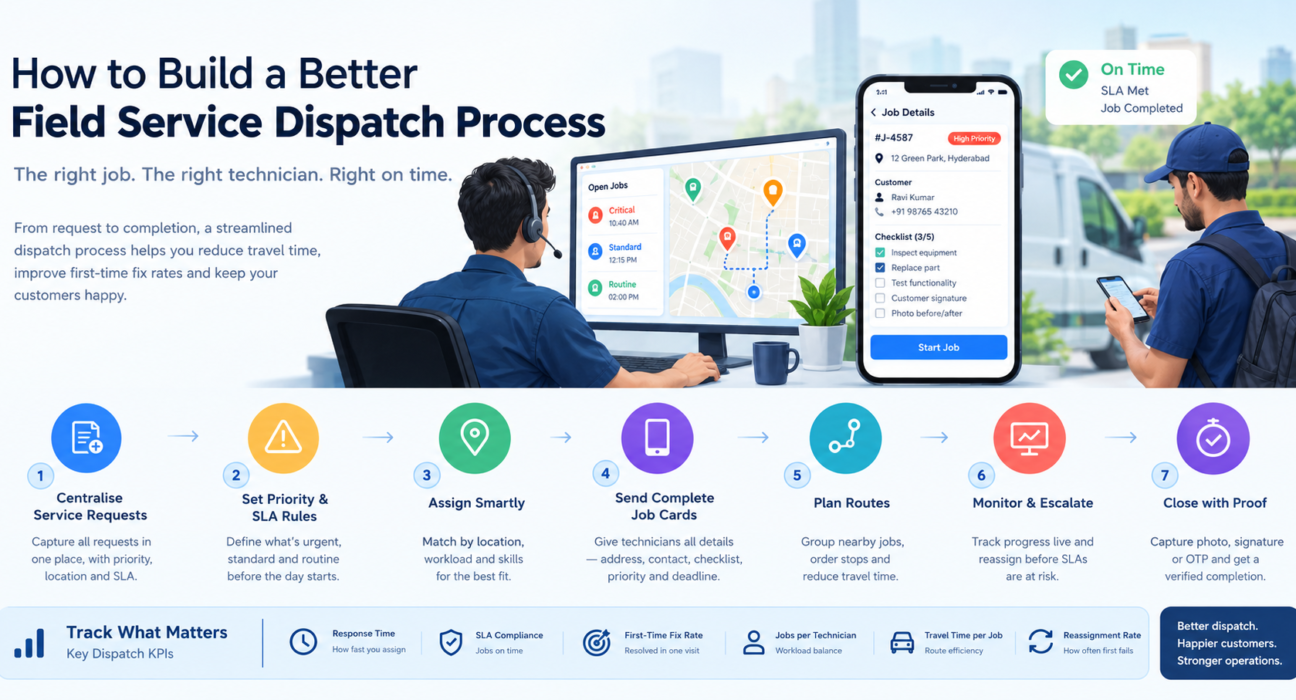
7 Steps to Build a Better Field Service Dispatch Process
1. Centralise every service request
Pick one place where all jobs are logged, whatever the source. Each request should capture the customer, location, issue type, priority and SLA deadline. If a job is not in the system, it does not exist.
2. Define priority and SLA rules in advance
Decide what makes a job urgent before the day starts. A simple tiering works well:
- Critical: a breakdown or a customer with an SLA at risk
- Standard: a scheduled installation, repair or AMC visit
- Routine: inspections and follow-ups
Written rules stop dispatchers from reprioritising on instinct.
3. Assign by location, workload and skill
The best technician is the one who can reach the job soonest with the right skills and capacity. Compare these three factors for every assignment:
- Distance and ETA to the job site
- Current workload and remaining jobs for the day
- Skill or job-type fit
4. Give technicians a complete job card
A technician should receive the address, customer contact, job type, checklist, priority and deadline on their phone. Missing details cause wasted trips, so reduce phone calls by putting everything in one place.
5. Plan routes, not just jobs
Assigning jobs without thinking about sequence adds avoidable driving. Group nearby jobs, order stops sensibly and leave room for emergencies. Route planning is where much of a field team’s daily time is won or lost.
6. Monitor jobs live and escalate early
Dispatch does not end at assignment. Watch for jobs that are unaccepted, running late or close to breaching SLA, and reassign before the customer calls. Escalation rules (for example, alert a supervisor when a critical job is unaccepted) catch problems early.
7. Close every job with proof
Require evidence before a job can close, such as a photo, customer signature, OTP or completed checklist. Proof settles disputes, supports billing and gives you data to improve.
Which Dispatch KPIs Should You Track?
You cannot improve what you do not measure. These metrics show whether your process is working:
| KPI | What It Tells You |
|---|---|
| Response time | How quickly a request is assigned after it arrives |
| SLA compliance | Share of jobs completed within the agreed deadline |
| First-time fix rate | Share of jobs resolved on the first visit |
| Jobs per technician per day | Workload balance and productivity |
| Travel time per job | Efficiency of assignment and routing |
| Reassignment rate | How often first assignments fail |
Start with two or three and review them weekly. A KPI that nobody looks at does not change behaviour.
Manual Dispatch vs Field Service Dispatch Software
Spreadsheets and chat groups work for a handful of technicians. They stop working as volume grows.
| Area | Manual Dispatch | Dispatch Software |
|---|---|---|
| Job intake | Calls, chats, spreadsheets | One central job list |
| Technician location | Phone calls to check | Live map |
| Assignment | Memory and guesswork | Based on location and workload |
| Job details | Typed or spoken messages | Job card with checklist |
| SLA monitoring | Checked manually | Timers and alerts |
| Proof of work | “Done” over the phone | Photo, signature or OTP |
| Reporting | Compiled at month-end | Real-time dashboards |
What to Look for in Field Service Dispatch Software
Not every tool covers the full dispatch cycle. Some only show GPS locations. When comparing options, check for:
- Live technician map with status and location
- Task assignment with priority, checklist and SLA deadline
- Route planning and optimisation to cut travel time
- SLA monitoring and escalation for at-risk jobs
- Proof of service capture such as photo, signature or OTP
- Offline mobile app, since network coverage in the field is uneven
- Custom forms and workflows so the tool matches your job types
- Real-time reporting on KPIs
- Integration options with your CRM, ERP or accounting systems
- Transparent pricing that does not punish you for adding technicians
How FieldExecutives Supports Field Service Dispatch
Businesses looking to simplify these processes can use field force management software such as FieldExecutives. It is built for India’s sales, delivery, collections and service teams, and it covers the dispatch workflow end to end.
- Assign and dispatch: Managers create tasks and visits with checklists, priority and an SLA. The job reaches the rep’s phone instantly, with smart suggestions based on location and workload.
- Guided execution with proof: Technicians follow a job card showing where to go and what to do. They capture a photo, signature and OTP, and the app works offline and syncs when the network returns.
- Live visibility: Every punch-in, route and outcome appears on one real-time map, with SLA timers running.
- AI route and beat-plan optimisation: Route ordering helps reduce travel time. FieldExecutives states that figures such as travel-time savings are illustrative, so test results against your own routes in the free trial.
- Custom workflows: Job types, checklists, approvals and forms can be configured without code.
- Real-time KPIs: Managers see performance data such as SLA compliance on the console.
Pricing is a flat monthly plan by team size, with all features on every plan and a 7-day free trial. Teams in field service and repair, telecom, facility management and similar industries can configure it to their workflow.
A Simple Dispatch Day: Example Workflow
Here is how the process can run in practice:
- A service request is logged with priority and SLA.
- The manager checks the live map and assigns it to the nearest available technician with capacity.
- The technician receives the job card with the checklist and deadline.
- The technician checks in at the site, completes the checklist and captures proof.
- The job closes and the data feeds the KPI dashboard.
The point is not speed alone. Every handoff leaves a record, which makes the next dispatch decision better.
Conclusion
A better dispatch process comes down to a few habits: one place for every request, clear priority rules, assignment based on location and workload, complete job cards, live monitoring and proof at closure. Measure response time, SLA compliance and first-time fix rate so you can see what is improving.