How to Track Competitor Activities During Field Visits
Your field reps visit more outlets, dealers and customers in a week than any analyst could in a month. They see competitor stock, pricing, promotions and shelf space first-hand. In most companies, almost none of that reaches decision-makers.
The information stays in a rep’s memory, a WhatsApp message or a half-filled spreadsheet. This guide explains how to capture it systematically, what to track, and how competitor tracking software for sales turns field observations into usable intelligence.
What Is Competitor Tracking in Field Sales?
Competitor tracking in field sales is the structured collection of competitor information by sales reps during customer or outlet visits. It covers pricing, product availability, promotions, shelf presence, and customer feedback about rival brands.
Done well, it gives you ground-level market intelligence that online research can’t provide. Done poorly, it becomes inconsistent notes that nobody trusts or reads.
Why Competitor Activity Tracking Matters
Competitors change quickly at the point of sale. A rival may launch a trade scheme, cut prices in one territory, or win shelf space overnight. If you only hear about it in a quarterly review, you’ve already lost the quarter.
Tracking competitor activity during field visits helps you:
- Respond faster to pricing changes and new schemes
- Spot territory-level threats before they show up in sales numbers
- Understand why you lose deals, using the objections customers actually raise
- Support planning with real market data instead of assumptions
- Equip reps with better counter-arguments and offers
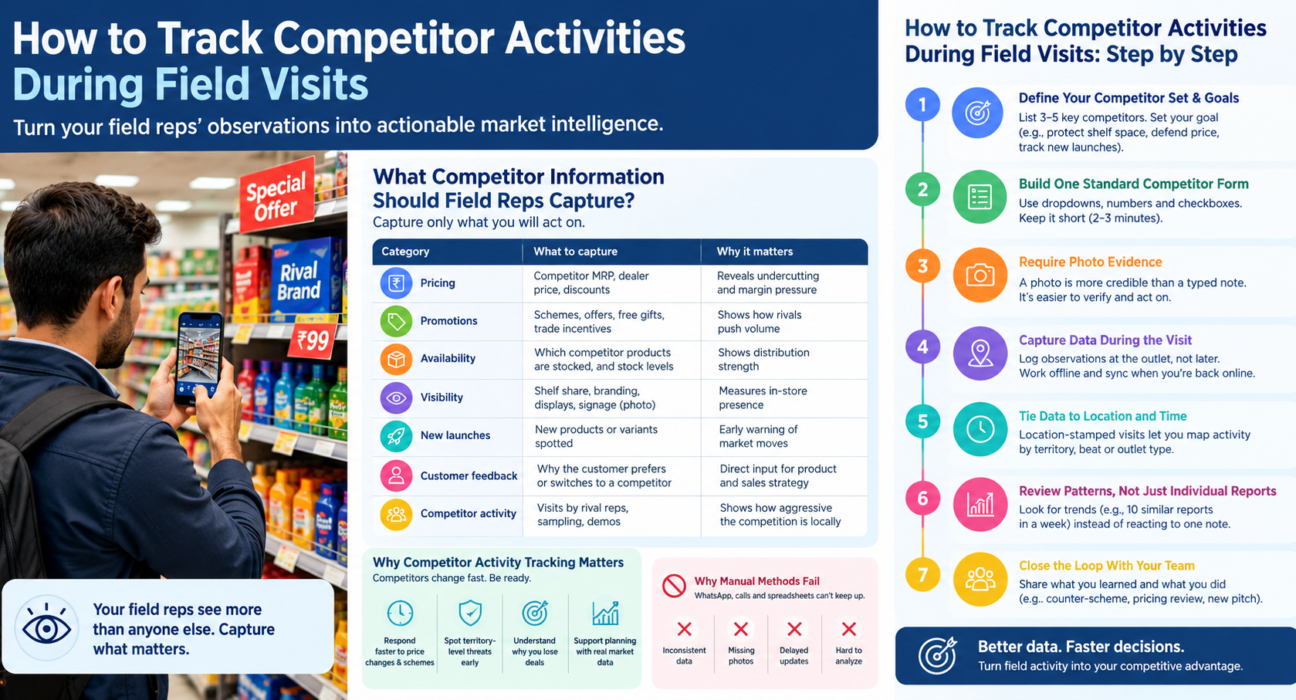
What Competitor Information Should Field Reps Capture?
Capture only what you will act on. Too many fields reduce form completion and data quality.
| Category | What to capture | Why it matters |
|---|---|---|
| Pricing | Competitor MRP, dealer price, discounts | Reveals undercutting and margin pressure |
| Promotions | Schemes, offers, free gifts, trade incentives | Shows how rivals push volume |
| Availability | Which competitor products are stocked, and stock levels | Shows distribution strength |
| Visibility | Shelf share, branding, displays, signage (photo) | Measures in-store presence |
| New launches | New products or variants spotted | Early warning of market moves |
| Customer feedback | Why the customer prefers or switches to a competitor | Direct input for product and sales strategy |
| Competitor activity | Visits by rival reps, sampling, demos | Shows how aggressive the competition is locally |
How to Track Competitor Activities During Field Visits: Step by Step
To track competitor activities during field visits, define what to capture, give reps a standard form, require photo evidence, collect data in real time, and review it regularly. Here is how each step works.
Step 1: Define Your Competitor Set and Goals
List the 3–5 competitors that matter most in each territory or channel. A competitor in one region may be irrelevant in another.
Then decide what you want to learn. Are you protecting shelf space, defending price, or tracking new launches? The goal determines the form.
Step 2: Build One Standard Competitor Form
Reps should answer the same questions in the same format at every visit. Free-text notes are hard to compare and almost impossible to analyze.
Use dropdowns, numeric fields and checkboxes wherever possible. Keep the form to what a rep can complete in two to three minutes.
Step 3: Require Photo Evidence
A photo of a competitor display, price tag or promotional poster is more credible than a typed description. It also lets managers verify the observation and review it later.
Photos make the data easier to trust, which makes teams more willing to act on it.
Step 4: Capture Data During the Visit, Not After
Information written down hours later is vague and often incomplete. Reps should log competitor observations at the outlet, while the details are fresh.
Field work often means weak connectivity, so the capture tool should work offline and sync later.
Step 5: Tie Competitor Data to Location and Time
An observation is only useful if you know where and when it was made. Location-stamped visits let you map competitor activity by territory, beat or outlet type.
They also confirm the rep was actually at the outlet, which protects the credibility of the whole dataset.
Step 6: Review Patterns, Not Just Individual Reports
One report that a competitor cut prices is an anecdote. Ten reports from the same area in one week is a trend.
Review competitor data weekly by territory and category. Look for repeated observations rather than reacting to every single note.
Step 7: Close the Loop With Your Team
Reps stop reporting when they never see what happens with their input. Share what you learned and what you did about it, whether that was a counter-scheme, a pricing review or a revised pitch.
Why Manual Methods Fail
Many teams still collect competitor insights through WhatsApp messages, phone calls or spreadsheets. These methods break down quickly.
- Inconsistent data: Every rep reports differently
- No proof: Observations can’t be verified
- Delays: Insights arrive days or weeks late
- No structure: Information is hard to search, filter or compare
- Low accountability: There’s no way to see which visits included competitor reporting
What Is Competitor Tracking Software for Sales?
Competitor tracking software for sales is a tool that lets field reps record competitor information during visits and gives managers a structured, searchable view of that data.
Two kinds of tools are commonly used:
- Dedicated competitive intelligence platforms. These mostly track competitors’ digital activity, such as websites, pricing pages and online content. They’re useful for desk research but don’t capture what happens at the outlet.
- Field force management software. This captures observations from the field itself, tied to verified visits, location and time.
For on-ground competitor tracking, the second category is usually the better fit. Your reps are already visiting customers, so the software’s job is to make capturing competitor data part of that visit.
Key Features to Look For
When evaluating software for tracking competitors during field visits, check for these capabilities:
- Custom forms: Build competitor forms for your market without coding
- Photo capture: Attach evidence to each observation
- Offline-first operation: Record data without a network connection
- Verified visits: Link each observation to a GPS-stamped, geofenced visit
- Task and visit assignment: Direct reps to specific outlets or competitor audits
- Real-time reporting: See submissions as they come in
- Role-based access: Control who views and edits data
- Integration options: Connect with CRM or other business systems
How FieldExecutives Can Help
Businesses looking to simplify these processes can use field force management software such as FieldExecutives, which brings visit management, verification and data capture into one platform.
FieldExecutives is not a dedicated competitive intelligence tool. It does not scrape competitor websites or track rivals online. What it offers is the field-side infrastructure that makes in-person competitor tracking reliable:
- Custom forms builder: Create competitor-audit forms with the fields, checklists and workflows your team needs, using drag-and-drop with no coding.
- Photo, signature and OTP proof: Reps capture photos of competitor displays or price boards as part of the visit.
- Geofenced, GPS-verified visits: Every observation is linked to a visit at the right location, so managers can trust where the data came from.
- Offline-first mobile app: Reps can complete forms and capture photos with no network, and everything syncs when they reconnect.
- Task and visit assignment: Managers can assign outlet visits, including audits, with checklists and priorities.
- Real-time tracking and reporting: Managers see field activity and submissions as they happen.
This gives sales leaders a practical way to make competitor reporting a standard part of every visit. Explore how FieldExecutives supports FMCG and distribution teams.
Practical Example: A Regional Beverage Distribution Team
This is a hypothetical example for illustration, not a customer case study.
A regional sales manager wants to know whether a rival brand’s new trade scheme is affecting sales in two cities. She adds a short competitor section to the standard outlet-visit form: competitor scheme seen (yes/no), scheme type, shelf photo, and shopkeeper comments.
Over one week, reps submit the form during their normal visits. By Friday, she can see that the scheme appears mainly in one city and mostly in small retail outlets. She can then decide on a targeted response instead of a company-wide price cut.
Best Practices for Competitor Tracking in the Field
- Keep forms short. Aim for a few minutes per visit.
- Standardize terminology. Use dropdowns so “scheme,” “offer” and “discount” don’t become three different categories.
- Rotate focus. Audit different competitors or categories in different weeks to avoid reporting fatigue.
- Respect ethics and law. Observe what’s publicly visible. Don’t misrepresent yourself or collect confidential competitor information.
- Verify before reacting. Look for repeat observations before making major pricing decisions.
- Share insights back. Show reps how their reports influenced decisions.
Conclusion
Your field team already sees what competitors are doing at the outlet level. The challenge is capturing that knowledge consistently, with proof, and getting it to the people who can act on it.
The approach is straightforward: define what to track, standardize the form, require evidence, capture it during the visit and review patterns weekly. The right competitor tracking software for sales makes that routine instead of occasional.
FieldExecutives gives field teams the forms, photo proof, verified visits and offline capture to make competitor observation part of every visit.