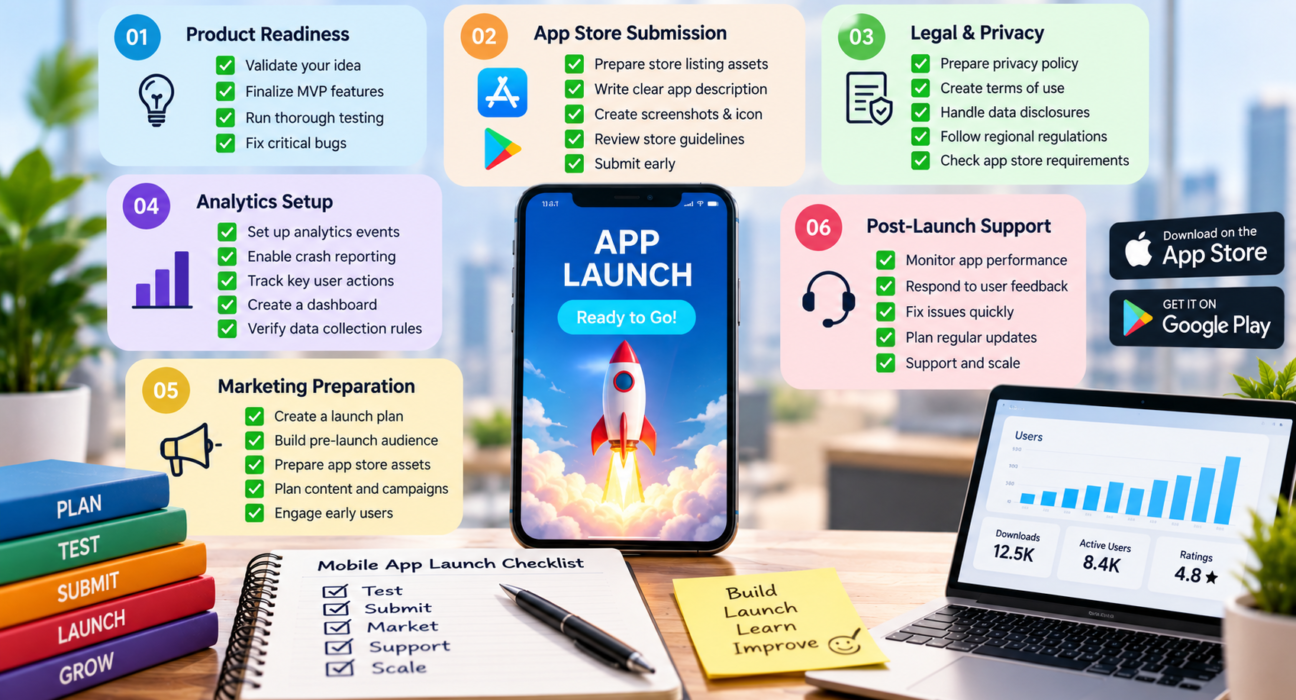
A good mobile app launch checklist covers six areas: product readiness, store requirements, legal and privacy basics, analytics, marketing, and post-launch support. Most first launches struggle not because the app is bad, but because one of these areas was left until the last week.
If you are a first-time founder, launch day can feel like a finish line. In reality, it is the start of a feedback loop. This guide walks through what to check before, during, and after release, so you can ship with fewer surprises and a clear plan for what comes next.
What Is a Mobile App Launch Checklist?
A mobile app launch checklist is a structured list of tasks a team completes before releasing an app to the public. It covers product quality, app store submission, legal compliance, marketing, analytics, and support readiness.
Think of it as a pre-flight check. Just as pilots do not skip it because they have flown before, first-time founders should not skip it because the app “looks done.”
Why First-Time Founders Need a Launch Checklist
Experienced product teams have launch routines built from past mistakes. First-time founders do not have that history, so gaps show up in familiar places:
- App store rejection because of missing privacy details or broken links
- No analytics, so early user behavior cannot be measured
- No support channel when the first confused user writes in
- A launch with no audience waiting for it
- Crashes on devices the team never tested
A checklist will not remove every risk, but it makes the avoidable ones visible early.
Mobile App Launch Checklist: Pre-Launch Phase
1. Confirm Product-Market Fit Signals
Before polishing the launch, confirm people actually want the app. Early signals may include:
- Interview feedback from target users
- A waitlist or landing page sign-ups
- Beta testers who return without being reminded
- Clear answers to “what problem does this solve, and for whom?”
If you have not validated the idea, do that first. Otherwise, launching a polished app nobody needs is an expensive way to learn the same lesson.
2. Finalize Your Minimum Viable Product (MVP)
Your first release does not need every feature. It needs the core feature that solves the main problem well. Review your feature list and ask:
- Does this feature support the core user journey?
- Can it wait for version 1.1?
- Will users notice if it is missing?
In fact, cutting scope is often the single best way to protect your launch date.
3. Run Thorough Quality Assurance
QA is more than checking that buttons work. Cover:
- Functional testing: every main flow, from sign-up to the key action
- Device and OS testing: a mix of screen sizes, older and newer OS versions, and both iOS and Android if you support both
- Performance testing: load time, battery use, and behavior on slow networks
- Usability testing: watch someone who has never seen the app try to use it
- Security checks: secure login, data storage, and API protection
- Edge cases: no internet, interrupted payments, denied permissions
Fix crashes and blocking bugs first. Minor visual issues, on the other hand, can be scheduled for later updates.
4. Set Up Analytics and Crash Reporting
Without data, post-launch decisions become guesses. For that reason, decide which events matter, such as sign-ups, onboarding completion, first key action, and purchases. Then confirm:
- Analytics events fire correctly
- Crash reporting is active
- You have a simple dashboard you will actually check
- Your data collection matches what you disclose in your privacy policy
5. Prepare Legal and Privacy Requirements
Apps usually need a privacy policy, terms of use, and accurate disclosures about the data they collect. Requirements vary by country, app category, and audience (for example, apps aimed at children or apps handling health or payment data face extra rules).
Verify before publishing: current app store privacy disclosure requirements and any regional regulations that apply to your users. Consult a qualified legal professional for your specific case.
App Store Submission Checklist
How Do You Prepare an App for App Store Submission?
Prepare your store listing assets, complete the required privacy and content declarations, test the release build, and submit early enough to allow for review time and possible resubmission.
Both the Apple App Store and Google Play have their own rules and review processes, so check each platform’s current guidelines before you submit.
Store Listing Essentials
| Item | What to Prepare |
|---|---|
| App name | Clear, memorable, and checked for trademark conflicts |
| Subtitle / short description | One line explaining the core benefit |
| Full description | Benefit-focused, easy to scan, with natural keywords |
| Screenshots | Show the core value in the first two or three images |
| App icon | Simple, recognizable at small sizes |
| Preview video (optional) | Short walkthrough of the main flow |
| Category and keywords | Chosen to match how users actually search |
| Support URL and contact | Working and monitored |
| Privacy policy URL | Live and accurate |
Common Reasons for Rejection
Rather than memorizing a list that changes over time, review the current guidelines and check for:
- Crashes or incomplete features in the review build
- Missing or inaccurate privacy information
- Test accounts or demo credentials not provided for login-gated apps
- Misleading descriptions or screenshots
- Broken links or placeholder content
Build in buffer time. In other words, treat the review window as part of your schedule, not an afterthought. As a result, launch week becomes far less stressful.
Marketing and Launch Readiness
How Early Should You Start Marketing Your App?
Start before the app is finished. For example, even a simple landing page and email waitlist gives you an audience on day one. Otherwise, marketing that begins on launch day usually reaches very few people.
Pre-Launch Marketing Tasks
- Build a landing page that explains the problem and who the app is for
- Collect emails from interested users
- Share progress with relevant communities where your audience already spends time
- Prepare a short press or announcement note
- Line up early testers who can leave honest reviews after launch
- Plan your app store optimization (ASO) approach
Launch Week Tasks
- Announce on your channels and to your waitlist
- Ask early users for feedback, and for reviews if they had a good experience
- Monitor store listings and respond to reviews
- Watch analytics and crash reports daily
Avoid buying fake reviews or inflating downloads, because it violates store policies and damages trust.
Soft Launch vs. Full Launch
Should First-Time Founders Do a Soft Launch?
In many cases, yes. A soft launch releases the app to a limited audience, such as a single region or a closed beta group, before the full public release. It lets you find bugs, test onboarding, and refine messaging with lower risk.
| Soft Launch | Full Launch | |
|---|---|---|
| Audience | Limited group or region | Everyone |
| Goal | Learn and fix | Grow and acquire |
| Risk level | Lower | Higher |
| Best for | Unproven onboarding or monetization | Validated, stable products |
Even if you have a fixed event or campaign date, a soft launch weeks earlier is still worth considering.
Post-Launch Checklist
The first few weeks teach you more than the previous six months of building. Therefore, plan for them.
First 48 Hours
- Watch for crashes and fix critical issues quickly
- Check that sign-up, login, and payments work in production
- Respond to early reviews and support messages
First 30 Days
- Review retention and onboarding drop-off
- Collect user feedback through in-app prompts or short surveys
- Prioritize a first update based on real behavior, not assumptions
- Compare actual usage with your original hypothesis
Ongoing
- Release regular updates for bugs, OS compatibility, and improvements
- Keep your store listing fresh
- Track the metrics tied to your business goal, not only downloads
When Do You Need an External Development Partner?
Some founders reach launch with a freelancer or in-house team. Others, however, realize late that they need help with QA, store submission, backend scaling, or post-launch maintenance. In that case, choosing the right partner matters as much as the checklist itself.
Platforms like GoFirms let businesses research and compare mobile app development companies, so you can review service areas, project experience, and fit before reaching out. Whichever route you take, ask about post-launch support and maintenance up front, since many launch problems appear after release.
[Internal Link Suggestion: GoFirms Mobile App Development Companies Page]
Quick Mobile App Launch Checklist (Summary)
Before launch
- [ ] Idea validated with real users
- [ ] MVP scope locked
- [ ] QA completed across devices and OS versions
- [ ] Analytics and crash reporting working
- [ ] Privacy policy and terms published
- [ ] Security basics reviewed
Store submission
- [ ] Listing assets ready (icon, screenshots, description)
- [ ] Privacy and content declarations completed
- [ ] Test credentials provided if login is required
- [ ] Release build tested
- [ ] Submitted with time for review
Marketing
- [ ] Landing page and waitlist live
- [ ] Beta testers and early users lined up
- [ ] Launch announcement prepared
After launch
- [ ] Daily monitoring in week one
- [ ] Support channel active
- [ ] Feedback collection in place
- [ ] First update planned
Frequently Asked Questions
What should be on a mobile app launch checklist?
A mobile app launch checklist should include product testing, analytics setup, legal and privacy documents, store listing assets, marketing preparation, a support plan, and post-launch monitoring. Together these cover technical readiness, store compliance, audience building, and the feedback loop that guides your first updates.
How long does it take to prepare for a mobile app launch?
It depends on the app’s complexity and whether marketing started early. Many teams spend several weeks on final QA, store preparation, and pre-launch marketing. Allow extra time for store review and possible resubmission, and avoid fixing a launch date before checking these steps.
What is the biggest mistake first-time founders make at launch?
Treating launch day as the finish line. Common mistakes include skipping analytics, starting marketing too late, ignoring store requirements, and having no plan for user feedback. Founders who plan the first 30 days after release usually adapt faster than those who stop at submission.
Do I need a soft launch before releasing my app publicly?
Not always, but it is often wise for first-time founders. A soft launch to a limited audience helps you catch bugs, test onboarding, and improve messaging before a wider release. It reduces risk, especially when the app handles payments or sensitive data.
How do I get my first users after launching an app?
Start with people you already reached: your waitlist, beta testers, and relevant online communities. Ask for honest feedback, respond to reviews, and improve onboarding quickly. Early users who feel heard are more likely to stay and recommend the app.
Why do apps get rejected from app stores?
Common causes include crashes, incomplete features, missing or inaccurate privacy information, misleading descriptions, and broken links. Review the current Apple and Google guidelines before submitting, and test the exact release build you plan to send.
Can I launch on iOS and Android at the same time?
You can, but it increases testing and support work. Some founders launch on one platform first to learn faster, then expand. The right choice depends on where your target users are, your budget, and your team’s capacity.
Conclusion
A solid mobile app launch checklist keeps a first release from depending on luck. In short, validate demand, limit your MVP, test properly, prepare your store listing and legal basics, start marketing early, and plan the first 30 days after release. Finally, if you need outside help to get there, you can research and compare mobile app development companies on GoFirms before choosing a partner.