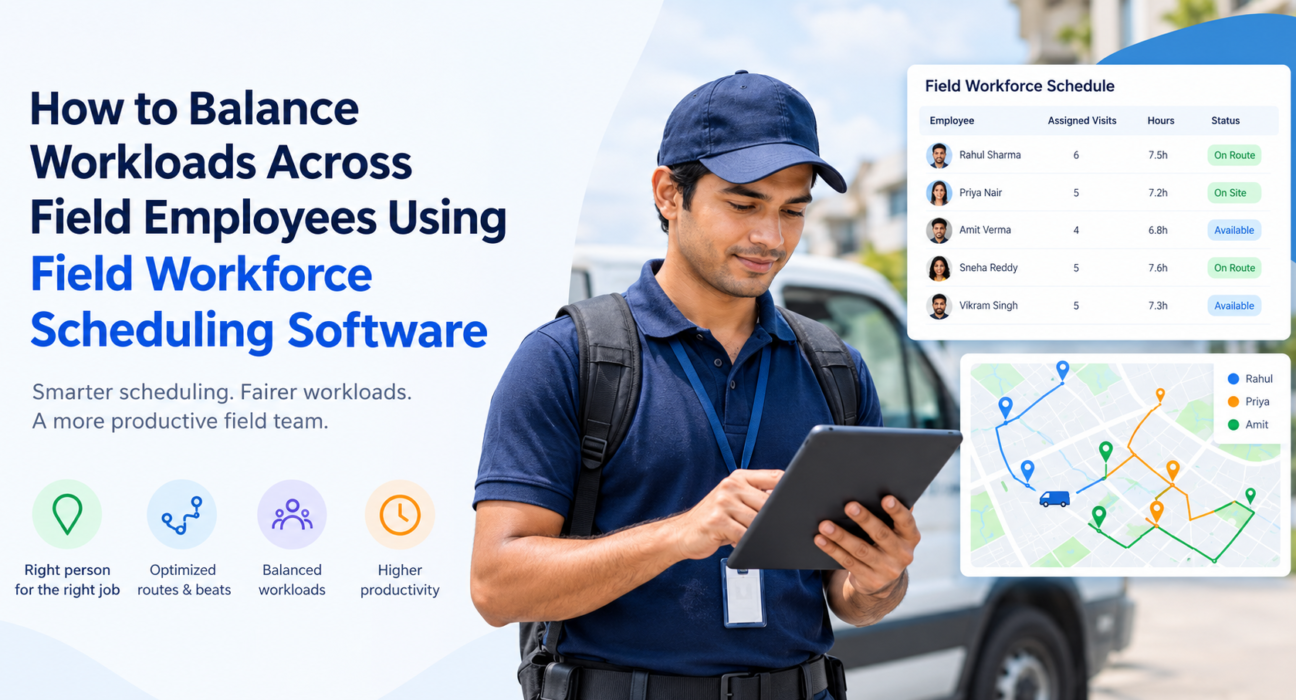
How to Balance Workloads Across Field Employees Using Field Workforce Scheduling Software
Some reps finish by 3 PM while others are still driving between visits at 8 PM. Some territories get covered twice, others not at all. If that sounds familiar, the problem is rarely effort. It is how work gets assigned.
To balance workloads across field employees, measure each person’s real capacity, assign work by location, skill, and availability, and review the numbers regularly. Doing this by phone calls and spreadsheets stops working beyond a handful of people, which is why teams turn to field workforce scheduling software.
This guide covers why workloads become uneven, a step-by-step method to fix it, and how scheduling software supports each step.
What Does It Mean to Balance Workloads Across Field Employees?
Workload balancing is the practice of distributing visits, tasks, and travel across your field team so that no one is consistently overloaded or underused. Balanced does not mean identical. A rep with a dense city territory and one covering a wide rural area will have different visit counts. What should be similar is the effort and time each person spends.
A balanced field team usually shows:
- Similar working hours across the team, with no habitual overtime for a few people
- Comparable travel time relative to territory size
- SLAs and visit targets met without last-minute scrambling
- Fewer missed or rescheduled visits
Why Field Workloads Become Uneven
Uneven workloads usually come from process gaps rather than people. The most common causes:
- Assignment by habit. Managers give urgent jobs to the most reliable rep, who then carries a heavier load every week.
- No live visibility. Without knowing who is free, in transit, or stuck at a customer site, dispatchers guess.
- Ignoring travel time. Counting visits but not distance makes a “fair” split of ten stops each very unfair in practice.
- Static territories. Customer bases change, but territories and beats stay as they were set months ago.
- Manual coordination. Updates scattered across WhatsApp, calls, and spreadsheets mean the picture is always out of date.
- No capacity data. Leave, attendance, and skills are tracked separately from scheduling, so planners assign work to people who are unavailable.
Why Balancing Workloads Matters
An unbalanced team costs you in three ways.
Burnout and attrition. Overloaded employees tire, make mistakes, and eventually leave. Replacing field staff means recruiting and retraining.
Missed commitments. Overloaded reps skip visits or close jobs hastily, which puts SLAs and customer relationships at risk.
Wasted capacity. Underused employees are paid for time that could have gone to revenue-generating or service-critical work.
How to Balance Workloads Across Field Employees: 6 Steps
- Define what “workload” means for your team. Count visits, job duration, travel time, and task complexity, not just the number of stops.
- Set each employee’s real capacity. Account for working hours, leave, skills, and territory size.
- Plan territories and beats around effort. Group customers geographically so travel is minimised and each beat is comparable in effort.
- Assign by location, skill, and current load. Send each job to the nearest qualified person who has capacity, not to whoever is usually chosen.
- Monitor in real time and reassign. When a visit runs long or someone is absent, move work to others before an SLA is breached.
- Review the data weekly. Compare hours, visits, and travel per rep, then adjust territories and targets.
Step 1: Measure the Right Things
Visit count alone hides imbalance. A useful workload picture combines:
| Metric | What it reveals |
|---|---|
| Visits or tasks per day | Volume of work |
| Travel time per day | Hidden effort from distance |
| Time spent per visit | Job complexity and delays |
| Hours worked vs. scheduled | Overtime and idle time |
| SLA adherence | Whether load is hurting quality |
| Leave and attendance | Actual availability |
Collecting this by hand is the first place most teams fall behind.
Step 2: Match Work to Skills and Availability
Not every job suits every person. Installations, audits, collections, and sales calls may need different skills. Record who can do what, then use that along with attendance and leave data when assigning work. This avoids sending a job to someone who cannot complete it.
Step 3: Build Smarter Routes and Beats
Travel is the most overlooked part of workload. Two reps with the same ten visits can have very different days if one’s stops are scattered across the city. Group visits by proximity and sequence them to cut backtracking. This is the idea behind route planning and beat planning.
Step 4: Reassign Dynamically
Plans break. A customer reschedules, a rep falls sick, an urgent job arrives. Teams that balance well can see current status and move work quickly instead of waiting for the next morning’s plan.
Step 5: Use Data in Reviews
Share workload and performance data with the team, and use leaderboards and KPIs to coach rather than to punish. If one rep consistently takes longer, the cause might be an oversized territory rather than poor performance.
How Field Workforce Scheduling Software Helps
Field workforce scheduling software is a system that lets you assign, schedule, and track field jobs while seeing each employee’s availability, location, and progress in real time. Instead of balancing workloads from memory, you work from live data.
Here is how common capabilities map to the workload-balancing steps:
| Balancing step | Software capability |
|---|---|
| Know who is available | Attendance, leave management, live status |
| Assign the right job | Task and visit assignment with location and workload suggestions |
| Reduce travel burden | Route and beat-plan optimisation |
| Respond to changes | Live map, status updates, reassignment |
| Protect service quality | SLA timers and escalation |
| Review and improve | Real-time KPIs, reports, and leaderboards |
What to Look for in Field Workforce Scheduling Software
Use this checklist when comparing tools:
- Live visibility of every employee’s location and status
- Task assignment that considers location, skill, and workload
- Route and beat planning to reduce travel
- Attendance and leave data connected to scheduling
- SLA tracking with timers and alerts
- Mobile app that works offline, since network coverage in the field is unreliable
- Custom forms and workflows so the tool fits your processes
- Reporting and KPIs to spot imbalance early
- Scalability across multiple cities, territories, and teams
How FieldExecutives Supports Workload Balancing
Businesses looking to simplify these processes can use field force management software such as FieldExecutives. It brings scheduling, tracking, and reporting into one platform so managers do not have to coordinate across calls, chats, and spreadsheets.
Based on the FieldExecutives website, the platform supports workload balancing in these ways:
- Assign and dispatch. Managers create tasks and visits with checklists, priority, and an SLA. The right rep receives the task on their phone, with smart suggestions based on location and workload.
- Live map and status. Managers see punch-ins, routes, and visit outcomes on one real-time map, so it is clear who is on the field, in transit, or idle.
- AI route and beat-plan optimisation. Optimised routes aim to reduce travel time, which evens out the effort behind each rep’s day. FieldExecutives states that AI routes can cut travel time by 20–30%, and notes that such figures are illustrative rather than guaranteed.
- Geofenced attendance. Server-time punch-ins with geofencing give a reliable view of who is actually working.
- SLA monitoring. SLA timers show which jobs are at risk, so you can reassign before a deadline is missed.
- KPIs and leaderboards. Managers get real-time performance data to review workloads and coach their teams.
- Offline-first mobile app. Reps can complete visits and capture proof without network access, and everything syncs once they reconnect.
- Custom forms and workflows. Job types, checklists, and approvals can be configured to match how your team works, without code.
Whether the platform fits your team depends on your size, industry, and workflow. A demo using your real scenarios is the best way to judge.
A Practical Example: Fixing an Uneven Territory Split
Consider a distribution company with five field reps. Two cover dense city beats and finish early. Three cover spread-out areas and regularly work late. The manager’s data shows equal visit counts per rep, so nothing looks wrong on paper.
Once travel time is included, the picture changes: the three rural-area reps spend far more of their day driving. The manager redraws beats to group stops by proximity, shifts a few outer customers to the city reps who have spare capacity, and reviews the numbers weekly. The visit counts change very little, but the hours become far more even.
This is an illustrative scenario, not a customer case study. It shows why travel and capacity data matter as much as task counts.
Best Practices for Sustainable Workload Balance
- Review territories quarterly or whenever your customer base changes significantly.
- Keep a capacity buffer for urgent jobs instead of scheduling everyone at 100%.
- Rotate difficult assignments so the same people do not always take them.
- Involve field employees. Ask what slows them down; they often know first.
- Track leading indicators like overtime and rescheduled visits, not just completed visits.
- Standardise job data with custom forms so effort can be compared consistently.
Conclusion
Uneven workloads are a process problem, and they can be fixed. Define workload beyond visit counts, track real capacity, plan routes around travel, reassign as conditions change, and review the data regularly. At scale, field workforce scheduling software makes this practical by giving managers live visibility and one place to assign, track, and review work.